


A wrong link in a paid post costs money the second it publishes. A caption that says "Happy Friday" on a Tuesday costs credibility. And a post that goes out on the wrong brand account — that one you never fully live down.
Most publishing errors don't come from bad marketers. They come from missing structure at the exact moment when structure matters most: the 30 seconds before someone clicks "Publish." Aviation has preflight checklists for this reason. Social teams almost never do, even though we're shipping dozens of pieces of content a week across five or six platforms, each with its own quirks.
This post is narrow on purpose. It's not about strategy or approvals in the abstract. This is about the mechanical, boring, career-saving layer: a social media preflight checklist, naming and version conventions your team can actually remember, and a rollback plan for when something slips through anyway. Copy the templates directly if you want.
The three errors that cause most of the damage
Before the checklist, it helps to know what you're actually defending against. Publishing errors tend to cluster into a pretty small set of repeat offenders:
| Error type | How it usually happens | Typical cost |
|---|---|---|
| Wrong link / broken UTM | Copied from a doc, tracking params stripped, or link never updated after a landing page change | Lost attribution, wasted ad spend, angry performance lead |
| Wrong asset version | Two files named final and final_v2, someone grabs the older one | Outdated pricing, old logo, un-approved claim goes live |
| Wrong account / wrong time | Manager logged into personal + brand at once; scheduler set to wrong timezone | Off-brand post, embarrassing delete, timezone-mismatched launch |
| Missing platform-specific field | Alt text skipped, aspect ratio wrong, first comment link forgotten | Accessibility gap, ugly crop, dead CTA |
| Un-approved copy edit | Someone tweaks a caption after sign-off "just to fix a typo" | Compliance risk, especially for regulated or paid content |
These aren't creative problems. They're handoff and version problems. The content was probably fine — it just got broken somewhere between approval and publish.
Why preflight fails even on good teams
The moment of highest error risk is also the moment of lowest attention. Publishing usually happens under time pressure, often by someone who wasn't the person who wrote or approved the piece. The scheduler is doing 14 posts in an afternoon and muscle memory takes over.
Stop managing your social media the hard way.
Postyly helps you plan, schedule, and analyze every post with precision.
- Multi-platform scheduling
- Real-time engagement tracking
- Automated performance reports
No credit card required
There's also a subtle trap: the more polished a post looks, the less anyone checks it. A rough draft gets scrutinized. A beautifully designed carousel with a confident caption feels done, so people skim it. That's exactly when the wrong link sails through.
The other big driver is version ambiguity. When a folder has carouselfinal.png, carouselfinalREAL.png, and carouselv3_approved.png, the person publishing has to guess which one is current. Guessing is where errors are born. A naming system that removes the guessing removes a whole category of mistakes without anyone having to try harder.
The compact preflight checklist (copy this)
Keep it short enough that people actually run it. A 40-item checklist gets ignored; a 12-item one gets used. This is the version to paste into whatever your team uses right before scheduling anything.
Content & copy
-
[ ] Caption matches the approved version — no post-approval edits
-
[ ] Date/day references are correct (no "Happy Friday" on the wrong day)
-
[ ] Any claim, price, or promo detail is current and approved
-
[ ] Spelling of names, handles, and product terms double-checked
Links & tracking
-
[ ] Link opens the correct page (actually click it, don't trust the text)
-
[ ] UTM parameters present and correct for the channel
-
[ ] First-comment link added if the platform buries links in captions
Assets
-
[ ] Correct file version pulled (matches approved filename exactly)
-
[ ] Aspect ratio correct for the placement (feed vs. story vs. reel)
-
[ ] Alt text added
-
[ ] Captions/subtitles burned in or uploaded for video
Account & timing
-
[ ] Publishing to the correct brand account (confirm the profile name/avatar)
-
[ ] Timezone on the scheduler matches the intended audience
-
[ ] Scheduled time is what the calendar says, not the default
Two things worth flagging. First, the "actually click the link" step catches more errors than any other single line — people trust link text far too much. Second, the account-confirmation step matters more than it looks, especially for anyone managing multiple clients from one dashboard. A mis-post to the wrong account is rare, but it's the one that ends up screenshotted in a group chat.
Naming and version conventions that survive contact with a real team
The best naming system is the one nobody has to think about. If people have to remember rules, they'll break them by Thursday. The goal is simple: the filename tells you everything you need to publish, and the newest approved version is always obvious.
Here's a template that holds up across platforms and campaigns:
``
[brand][campaign][platform][format][YYYYMMDD][vNN][status].ext
``
Real example:
``
acmespringigreel20250612v03APPROVED.mp4
acmespringigreel20250612v04DRAFT.mp4
``
-
- Kill the word "final." Ban it entirely. "Final" is where version control goes to die. Use
vNNnumbers instead —v01,v02,v03. There is no such thing as final, only "latest approved." -
- Status is a hard signal, not a vibe. Only three states
DRAFT,APPROVED,LIVE. The publisher only ever touchesAPPROVEDfiles. If it saysDRAFT, it doesn't go out, no exceptions. -
- Dates in
YYYYMMDDso files sort chronologically on their own.20250612sorts correctly;June12does not. -
- Two-digit versions (
v03, notv3) sov10doesn't sort beforev2.
One pattern worth stealing: when a file hits
APPROVED, move it to a locked "ready to publish" folder and don't edit it there.
This single change eliminates the "someone tweaked the approved file" problem, because the approved file is physically separate and untouched.
A rollback and incident plan for when something slips through anyway
Even with a solid checklist, something eventually goes out wrong. The difference between a minor blip and a bad afternoon is whether you decided in advance what to do. Panicking in the moment leads to messy deletes and half-fixes that make everything worse.
-
Assess before touching anything (60 seconds). Is this a typo, a wrong link, a wrong-account post, or a compliance/claim problem? The category decides the response. Don't reflexively delete — sometimes deleting is worse than editing.
-
Contain. If it's paid, pause the ad first so spend stops immediately. Pausing is instant; fixing can wait five minutes. For organic, decide edit vs. delete based on how far it's spread.
-
Fix or replace. Edit in place if the platform allows and the change is minor. Delete-and-repost if the error is baked into the asset (wrong logo, wrong price) — but grab the engagement numbers first so you're not blind on reporting.
-
Log it. One line
what happened, when, why it slipped, what caught it. This isn't blame; it's how you improve the checklist.
-
Patch the checklist. If an error type happened once, it'll happen again unless the checklist changes. Add the line that would have caught it.
The rule to internalize on rollback: money errors get paused first, credibility errors get fixed fast, and legal/claim errors get escalated, not silently deleted. A wrong price that's been live for 20 minutes may still owe someone a honored order. A deleted post that a customer already screenshotted still exists. Knowing the category keeps you from making the wrong reflex move.
Decision guide: edit, delete, or leave it
-
Edit in place when
typo, minor caption fix, adding a missing first-comment link, and the platform allows editing without killing engagement.
-
Delete and repost when
wrong asset version, wrong pricing/claim baked into the image, or the post went to the wrong account.
-
Leave it and add a correction comment when
the post has significant traction, the error is minor, and deleting would look worse than owning it.
These aren't always clean calls. A wrong promo code on a post with 200 comments gets messy fast no matter what you do — which is exactly why having a default decision framework saves you from improvising under pressure.
Where lightweight version control actually lives day to day
You don't need heavy software to run this. A shared drive with a strict folder structure and the naming convention above gets a small team most of the way there. The system matters more than the tool.
The friction usually isn't the files though — it's keeping the checklist, the approved version, and the schedule connected so the person publishing sees all three in one place. When those live in three different tabs, the checklist gets skipped. Teams that centralize their content workflow — where the approved asset, the preflight steps, and the scheduled slot all sit together — tend to catch errors earlier simply because the information isn't scattered.
That's where a workflow platform earns its keep: not by being clever, but by making the right version and the checklist unavoidable at the publish step. Some teams layer in AI-assisted checks here too — flagging a missing alt text field or a link that doesn't match the campaign's expected domain before anything schedules — but the checklist itself is still doing the real work.
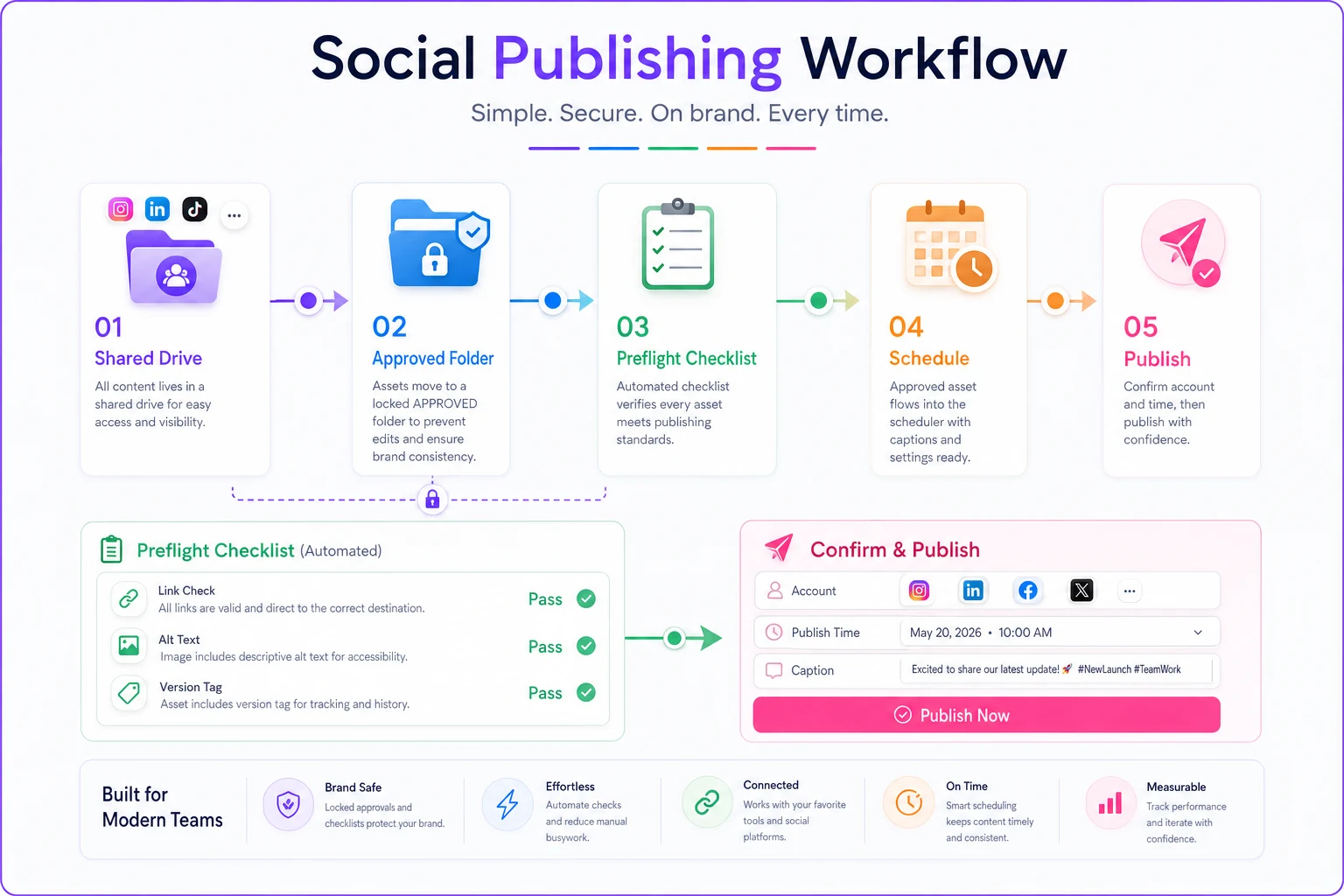
A quick visual like this makes it obvious where the checklist, the approved file, and the scheduler meet.
Some teams layer AI checks on top, but the basic workflow — one approved file, one checklist, one scheduler view — is what actually prevents the mistakes.
Real scenario: a small e-commerce brand with a two-person social team
A DTC skincare brand running promos across Instagram, TikTok, and email had a recurring problem: roughly once every couple of weeks, a post would go out with either a broken promo link or last month's discount code still in the caption. On a busy launch, one wrong code sat live for around 40 minutes and honored the wrong discount — a small but annoying margin hit, plus a handful of confused DMs.
The fix wasn't fancy. They banned the word "final," moved to the vNN_APPROVED naming pattern, and pasted a 12-line preflight checklist into the top of their scheduling doc. They added the "actually click the link" step as a hard rule.
Over the following couple of months, wrong-link and wrong-code incidents dropped to near zero — one slip, caught in preflight before it published. The publisher said the biggest change wasn't the checklist itself but that there was now exactly one approved file with an obvious name, so she stopped guessing which asset was current. The whole setup took an afternoon.
When this level of process makes sense — and when it's overkill
Worth it when: you're publishing across three or more platforms, handling multiple clients or brand accounts, running paid spend where a wrong link burns budget, or dealing with any regulated claims. The more expensive an error is, the more a 90-second checklist pays for itself.
Probably overkill when: you're a solo creator posting to one account a few times a week. A mental checklist and a single "current" folder is genuinely enough. Don't build a versioning system for a problem you don't have — process you don't need just becomes process you ignore, which trains you to ignore the process you do need.
The trap to avoid either way: a checklist so long nobody runs it. If yours creeps past around 15 items, cut it. The value is in the 30 seconds it actually gets used, not in how thorough it looks on paper.
Getting started this week
Pick two things and do only those. Ban the word "final" and switch to vNN_APPROVED naming — that alone kills most version-mixup errors. Then paste the 12-line checklist into wherever you schedule and make the "click the link" step non-negotiable.
Everything else — the rollback flow, the incident log, the locked approved folder — you can layer in once the basics are habit. Teams that stay error-free aren't more careful than everyone else. They just moved the carefulness into a system, so being careful doesn't depend on anyone having a good day at 4:45 on a Friday.
Everything else — the rollback flow, the incident log, the locked approved folder — you can layer in once the basics are habit. Teams that stay error-free aren't more careful than everyone else. They just moved the carefulness into a system, so being careful doesn't depend on anyone having a good day at 4:45 on a Friday.
Ready to amplify your brand’s voice?
Join 2,500+ marketers using Postyly to save time, boost engagement, and grow their audiences effectively.