



This is the companion piece to the localization work covered in Localize social content at scale: rule-based templates, quick cultural checks and approval SLAs. That article handled the rule-based templates, the quick cultural checks, and the approval SLA framing. This one doesn't repeat any of that. Instead, it takes seven concrete features you'd actually spec for a social scheduling platform and walks through exactly how each one needs to behave when you're running localized content across markets.
The framing here is deliberately unglamorous: for every feature you get (a) why it matters day-to-day plus a priority rank by daily impact, (b) acceptance criteria with real edge cases, (c) KPIs and the instrumentation events you actually need to fire, (d) an integration and data-flow checklist, and (e) a short sample artifact you can hand to engineering.
Priority order
Priority order, ranked by how often the feature actually touches a localization manager's day:
| Rank | Feature | Daily-impact reason |
|---|---|---|
| 1 | Approval workflows | Every localized variant hits a gate; blockers here stall everything downstream |
| 2 | Shared content calendar | The single source of truth for "what's going where, in which market, when" |
| 3 | Native per-platform post previews | Catches rendering/truncation errors before they go live per locale |
| 4 | Engagement inbox | Localized replies need language routing; delays here are visible to customers |
| 5 | Asset library with reuse metrics | Drives whether you re-translate or reuse; compounding time savings |
| 6 | Role-based access | Prevents the wrong person publishing to the wrong market |
| 7 | Automated reporting templates | High value weekly/monthly, but not a per-hour blocker |
Reporting ranks last not because it's unimportant — it's because its cadence is weekly, not hourly. Daily impact is the ranking axis.
1. Approval workflows (highest daily impact)
Why it matters day-to-day
Stop managing your social media the hard way.
Postyly helps you plan, schedule, and analyze every post with precision.
- Multi-platform scheduling
- Real-time engagement tracking
- Automated performance reports
No credit card required
In a localized setup, a single master post can fan out into eight or twelve market variants, and each variant may need a different reviewer. The Spain variant goes to the Madrid lead, the Brazil variant to a Portuguese reviewer. The approval layer is where localization actually lives or dies. The SLA context and the approval matrix itself are covered in the parent article, so I won't re-derive them here. What matters for the feature spec is how the workflow handles fan-out, conditional routing, and partial approvals. The mistake teams make: they build one approval chain and bolt "markets" on afterward. Then a Japan variant that needs legal review sits in the same lane as a low-risk Instagram story, and the whole queue backs up behind the slowest reviewer.
Acceptance criteria and edge cases
-
A master post can spawn N locale variants, each with an independent approval state.
-
Approving the master does not auto-approve variants unless explicitly configured.
-
A reviewer can approve, reject with required comment, or request changes.
-
Conditional routing
if
variant.market == "DE"andvariant.contains_pricing == true, route to legal queue.
Edge cases to test:
-
Master post edited after three of eight variants are approved → those three must flip to "needs re-review" with a clear diff flag, not silently stay approved.
-
Reviewer assigned to a market goes inactive mid-review → variant must reassign to backup reviewer, not freeze.
-
Two variants share a reviewer; reviewer approves one and the platform crashes → on recovery the other must remain in its pre-crash state (idempotent approvals).
-
A rejected variant is resubmitted → approval history must retain the prior rejection and comment, not overwrite it.
KPIs and instrumentation events
-
Median time-in-queue per market (not global average — averages hide the one slow market).
-
Re-review rate after master edits (high rate = people editing masters too late).
-
Rejection reason distribution per locale.
Events to fire: variant.submitted, variant.approved, variant.rejected {reason}, variant.reassigned, master.editedpostapproval. Each carries market, reviewerid, variantid, and elapsed_ms.
Integration and data-flow checklist
-
Webhook out on every state change so the calendar (feature 2) stays in sync.
-
Idempotency keys on approval actions to survive retries.
-
If routing to an external legal/review tool, handle its rate limits with a queue, and treat its timeout as "pending," never "approved."
Use idempotency keys on approval actions so retries don't create duplicate approvals or lost state.
Sample artifact — variant approval state object
{ "variantid": "v8812de", "masterid": "m8812", "market": "DE", "state": "needsrereview", "reviewerid": "u204", "backupreviewerid": "u219", "history": [ {"state": "submitted", "ts": "..."}, {"state": "approved", "ts": "..."}, {"state": "needsrereview", "reason": "masteredited", "ts": "..."} ], "requireslegal": true }
A visual helps show how variants route, where backups kick in, and how state transitions are intended to behave.
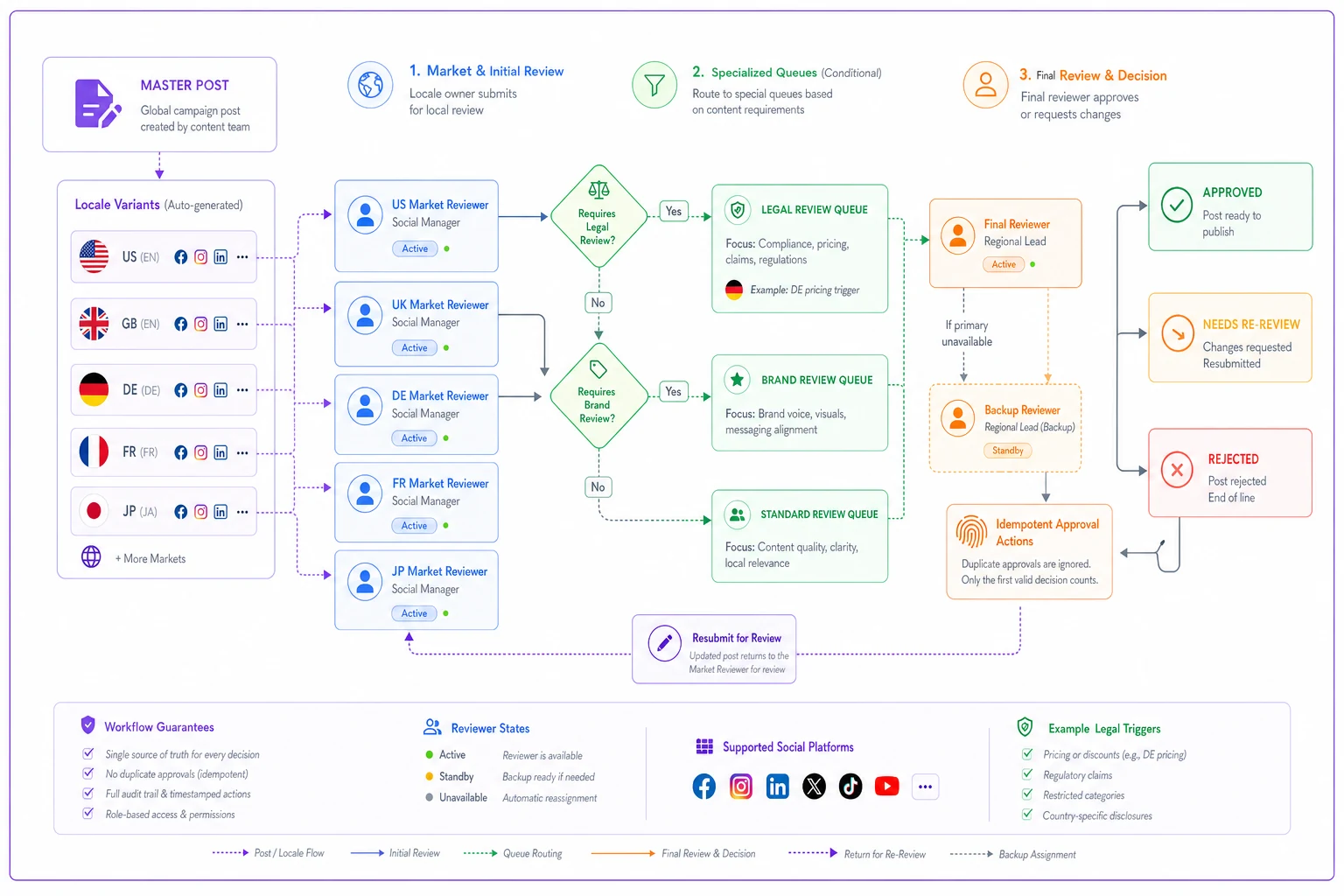
It illustrates routing, backup assignment, and state transitions so engineers and reviewers share a single mental model.
2. Shared content calendar
Why it matters day-to-day
The calendar is where a localization manager answers the question they get asked constantly: "is the French version going out before or after the English one?" In multi-market work the calendar isn't just a grid of posts — it's a grid of posts times locales. The single biggest source of confusion is a calendar that shows the master but hides the variants, so nobody can see that Brazil is scheduled for 3am local time. A pattern worth calling out: teams that schedule everything in the HQ timezone and expect markets to "just adjust." It never works. The calendar has to render in the viewer's chosen market timezone, and it has to make timezone explicit on hover.
Acceptance criteria and edge cases
-
Calendar renders per-market variants as distinct, filterable entries under their master.
-
Timezone is always displayed; a post scheduled for "9am" must show which 9am.
-
Filtering by market shows only that market's variants plus an indicator of the parent master.
Edge cases:
-
A market observing daylight saving shifts → scheduled local time must stay fixed to local wall-clock, not drift by an hour.
-
A variant with no scheduled time yet (still in approval) → shows as "unscheduled" in a holding lane, not missing entirely.
-
Two markets sharing a language but different posting windows (es-ES vs es-MX) → must appear as separate entries, not merged.
KPIs and instrumentation events
-
Collision count
variants from the same campaign scheduled within a window that violates your own spacing rules.
-
Unscheduled-but-approved count (approved variants sitting with no slot = wasted approval).
-
Calendar filter usage by market (tells you which markets people actually manage daily).
Events: calendar.viewed {filtermarket}, variant.scheduled {localtime, tz}, variant.rescheduled, collision.flagged.
Integration and data-flow checklist
-
Consumes approval webhooks from feature 1 so approved variants surface automatically.
-
Writes schedule intent to the publishing queue, which talks to each platform API.
-
Store times as UTC + IANA timezone string, never as a naive local time.
The calendar must make timezone explicit and preserve local wall-clock times across DST transitions.
3. Native per-platform post previews
Why it matters day-to-day
This is the feature that catches the stuff that embarrasses you. A German translation runs roughly 30% longer than English on average — a headline that fit on one line in English wraps and truncates in German on a mobile LinkedIn card. Right-to-left languages break layouts that were never tested RTL. Previews rendered natively per platform and per locale are the only reliable way to catch this before publish. The common failure here is a single "generic preview" that approximates all platforms. It lies. X truncates differently than a Facebook link card, and an Instagram caption's "more" cutoff lands at a different character count than a LinkedIn post's.
Acceptance criteria and edge cases
-
Preview renders the actual platform card for each target platform, using the localized text and locale-specific fonts.
-
Character/truncation behavior matches the live platform within the platform's documented limits.
-
RTL locales render RTL, including punctuation and embedded numbers.
Edge cases:
-
Emoji that renders wider on one platform → truncation point must reflect that platform's handling.
-
A URL in the body that the platform auto-shortens → preview must show the shortened form's effect on character count.
-
Locale with combined characters (e.g., Thai) where naive character counts mislead → count by platform's own rule, not
string.length. -
Hashtag that's fine in English but reads poorly in another market's language → preview should surface the resolved hashtag text clearly for the reviewer (the cultural-check logic itself lives in the parent article).
KPIs and instrumentation events
-
Truncation-flag rate per locale (German and Finnish will top this list).
-
Preview-to-edit rate
how often seeing the preview triggers a fix (high = preview is earning its keep).
Events: preview.rendered {platform, locale}, preview.truncationflagged, preview.triggerededit.
Sample artifact — per-platform preview spec (excerpt)
platform: linkedin captiontruncateat: 210 chars (desktop feed) linkcard: titlemax 150, descmax 100 countsas: graphemeclusters platform: x bodytruncateat: 280 weighted chars urlweight: 23 (t.co) countsas: weighted (CJK = 2) platform: instagram captionmorecutoff: ~125 chars visible countsas: graphemeclusters rtllocales: [ar, he, fa, ur]
Previews must match the live rendering enough that reviewers rarely need to guess about truncation or layout.
4. Engagement inbox
Why it matters day-to-day
Localized publishing creates localized conversations. If someone replies in Portuguese to your Brazil post, that reply cannot land in an undifferentiated pile where an English-only agent sees it first. The inbox needs language detection and market routing, or response times quietly fall apart in exactly the markets where you have the fewest resources. An underrated detail: the inbox is where localization quality gets audited in public. If your translated post had an awkward phrase, the replies will tell you. Teams that route inbox items back into their localization notes catch recurring translation issues far faster than teams that treat the inbox as pure customer service.
Acceptance criteria and edge cases
-
Incoming messages auto-tagged with detected language and mapped to the responsible market queue.
-
Agent sees the original localized post that the message is replying to, inline.
-
Unrecognized language falls back to a human-triage queue, never silently to the default market.
Edge cases:
-
A reply mixing two languages (code-switching) → route by dominant language but flag as mixed.
-
A reply to a cross-posted variant that exists in three markets → attribute to the specific variant the user actually saw, using the post ID, not a guess.
-
Platform delivers the same message twice via webhook → dedupe by platform message ID.
KPIs and instrumentation events
-
First-response time per market (the number that exposes under-resourced locales).
-
Misroute rate (messages reassigned after initial routing).
-
Language-detection confidence distribution.
Events: inbox.messagereceived {platform, detectedlang, confidence}, inbox.routed {marketqueue}, inbox.misrouted, inbox.firstresponse {elapsed_ms}.
Inbox wireframe checklist
-
[ ] Message list grouped by market queue, with unassigned/triage pinned on top
-
[ ] Each item shows
detected language, confidence badge, source platform, linked variant
-
[ ] Inline view of the original localized post text
-
[ ] Quick-filter
by market, by language, by response-overdue
-
[ ] Overdue indicator keyed to per-market SLA, not a global one
-
[ ] One-click reassign to another market queue with reason capture
Integration and data-flow checklist
-
Ingests platform webhooks per channel; handle each platform's rate limits with backoff.
-
Dedupe on platform message ID before routing.
-
Language detection as a service call with a timeout → on timeout, route to triage, never to default.
The inbox should route with confidence badges visible so agents can triage mixed-language or low-confidence cases quickly.
5. Asset library with reuse metrics
Why it matters day-to-day
In localization, the asset library answers a money question: do we re-shoot/re-translate, or reuse what we have? Without reuse metrics, teams default to recreating assets because nobody can prove the old one performed. With them, you can see that a particular lifestyle image has been localized into six markets and still pulls strong engagement, so market seven reuses it instead of commissioning new work. Worth flagging: assets often get localized versions — translated overlays, market-specific captions — but the library treats them as unrelated files. You lose the lineage. The fix is linking every localized derivative back to its source asset so reuse metrics roll up correctly.
Acceptance criteria and edge cases
-
Every asset tracks
source asset ID (if derivative), markets used in, times reused, aggregate performance.
-
Searching an asset shows all its localized derivatives.
-
Reuse count increments on actual publish, not on draft insertion.
Edge cases:
-
A derivative edited into a new derivative → lineage chains, so the root asset's reuse rollup stays correct.
-
An asset with expiring usage rights → library must block scheduling past the expiry and warn at variant creation (rights taxonomy detail is out of scope here; the library just enforces the flag).
-
Same asset reused in two variants of the same campaign in one market → counts as two uses but flags potential fatigue.
KPIs and instrumentation events
-
Reuse rate (reuses ÷ total assets) — rising is good, it means less wasted recreation.
-
Localization-derivative ratio per source asset.
-
Performance-weighted reuse
are people reusing the good assets or just the available ones?
Events: asset.published {assetid, market, isderivative}, asset.derivativecreated {sourceid}, asset.rightsexpiryblocked.
Sample artifact — asset reuse data model
Asset id rootid # null if original type # image | video | captionblock marketsused: [] # ["DE","FR","ES-MX"] reusecount # increments on publish rightsexpiry # date | null performance: impressions engagementrate Derivative-of relationship: Asset.root_id -> Asset.id
Lineage matters: make derivatives searchable from the root asset so reuse metrics roll up correctly.
6. Role-based access
Why it matters day-to-day
The daily risk in multi-market publishing is straightforward: the wrong person pushes something to the wrong market. A contractor handling the LATAM accounts should not be able to publish to the corporate US handle. Role-based access scoped by market and by action is what prevents the quiet 2pm disaster where a test post lands on the main brand channel. Most permission models are built around roles only — "editor," "admin." In localization you need a second axis: market scope. An "editor" in France should be able to draft and submit French variants but not touch German ones.
Acceptance criteria and edge cases
-
Permissions are defined as (role × market × action).
-
A user can hold different roles in different markets.
-
Attempting an action outside scope is blocked with a clear message, and the attempt is logged.
Edge cases:
-
User removed from a market mid-session → next action in that market must fail, even if the UI was loaded before removal.
-
A global admin role → must still respect any explicit market-level deny (deny beats allow).
-
Reviewer with approval rights in Market A but only draft rights in Market B → UI hides the approve button in B, and the API rejects it too (never trust the UI alone).
KPIs and instrumentation events
-
Blocked-action count by market (spikes can indicate a scoping misconfiguration).
-
Permission-change frequency (churn here often precedes mistakes).
Events: access.actionblocked {user, market, action}, access.rolechanged, access.crossmarketattempt.
When this matters most vs. when it's overkill For a two-person team running three markets, heavy market-scoped roles are overkill — you'll spend more time managing permissions than publishing. It starts paying off around the point where you have external contributors, regulated markets, or more than a handful of channels. If you can name every publisher from memory and trust them all, keep it light.
7. Automated reporting templates
Why it matters day-to-day — and why it ranks last
Reporting is lowest on the daily-impact scale because its natural cadence is weekly or monthly, not hourly. But for localization specifically, it answers the question that justifies the whole operation: is market-specific content outperforming generic translated content? A template that can slice performance by market, by locale, and by original-vs-localized is the difference between "we think localization helps" and "localized variants in Brazil run roughly 1.4–1.6x the engagement of the English cross-post."
Acceptance criteria and edge cases
-
Templates can group by market, locale, platform, and campaign.
-
A "localization lift" view compares a master's performance against its localized variants.
-
Scheduled report generation is idempotent — re-running for the same period gives the same numbers.
Edge cases:
-
A market with partial data (channel connected mid-period) → report must flag partial coverage, not silently under-report.
-
Currency/number formatting per locale in the output → a report for the France stakeholder formats numbers in French convention.
-
Deleted variant mid-period → its historical metrics stay in the report; deletion doesn't rewrite history.
KPIs the template should surface
-
Localization lift per market (variant performance ÷ master performance).
-
Coverage completeness (markets with full-period data).
-
Cost-to-reuse ratio when tied to the asset library.
Events: report.generated {template, period, markets}, report.exported {format}, report.partialdataflagged.
Integration and data-flow checklist
-
Pulls normalized metrics from your analytics layer; reconcile against each platform API's own numbers and note discrepancies rather than hiding them.
-
Respect per-platform API rate limits during metric pulls — stagger large backfills.
-
Store report snapshots so a regenerated report doesn't shift because upstream data was restated.
Templates should default to a per-market breakdown so stakeholders don't need to drill down every time.
A short real scenario
A mid-size consumer-goods team was running five markets off one HQ calendar. Their recurring problem wasn't translation quality — it was coordination. Approved German variants kept going out truncated on LinkedIn mobile, and Brazilian replies sat unanswered for a day or more because everything landed in one English-first inbox.
They made two changes that map directly to features above: native per-platform previews per locale, and an engagement inbox with language routing. Within a couple of months the truncation incidents dropped from a steady handful each week to near zero, and first-response time in the Brazil queue fell from well over 20 hours to under 4. Nothing exotic — the features just stopped the two errors that were most visible to customers.
Worth noting is the order. They didn't start with reporting, even though leadership wanted the dashboards first. The daily blockers were previews and inbox routing, so those came first. Reporting came later, once the operation was stable enough that the numbers actually meant something.
How to sequence a build
How to sequence a build (numbered)
-
Approval workflows with per-variant state and conditional routing — nothing else works cleanly until gates are reliable.
-
Shared content calendar that consumes approval events and renders per-market timezones.
-
Per-platform previews per locale to kill the visible rendering errors.
-
Engagement inbox with language detection and market routing.
-
Asset library with derivative lineage and reuse metrics.
-
Role-based access scoped by market once you have external or regulated contributors.
-
Automated reporting templates with per-market and localization-lift views.
For the rule-based templates, cultural-check heuristics, and approval SLA targets that sit underneath all of this, go back to the parent piece: Localize social content at scale: rule-based templates, quick cultural checks and approval SLAs. This spec deliberately stays on the product-feature side so the two don't overlap — one gives you the rules, this one gives you the features that enforce them.
For the rule-based templates, cultural-check heuristics, and approval SLA targets that sit underneath all of this, go back to the parent piece: Localize social content at scale: rule-based templates, quick cultural checks and approval SLAs. This spec deliberately stays on the product-feature side so the two don't overlap — one gives you the rules, this one gives you the features that enforce them.
Ready to amplify your brand’s voice?
Join 2,500+ marketers using Postyly to save time, boost engagement, and grow their audiences effectively.