


Most social media teams waste their batch production days. They show up with a camera, shoot whatever feels right, then spend the next three weeks scrambling to edit clips between meetings. Content trickles out slowly, inconsistently, and by the time it's posted, half the footage already feels stale.
A proper batch system changes that. When you structure one production day correctly, you walk away with 30-40 pieces of content — fully edited, tagged, and scheduled across platforms. No scrambling, no last-minute edits, no forgotten uploads.
The difference is operational structure. Not creativity, not expensive equipment, not headcount. Just clear workflows that turn a chaotic shoot into predictable output.
Why traditional video shoots fail for short-form content
Traditional production treats every piece like a mini documentary. One concept, one shoot, one edit, one upload. That rhythm works fine for hero content or big campaigns, but it destroys efficiency when you need daily posts across TikTok, Instagram Reels, YouTube Shorts, and LinkedIn.
The math doesn't work. If you need 5 videos per week across 4 platforms, that's 20 pieces of content. Using traditional methods, you'd need 20 separate production cycles. Even if each cycle only takes 2 hours, you're looking at 40 hours a week just for video. That's basically a full-time job.
Teams usually solve this by rushing. They shoot quickly, edit sloppily, and wonder why engagement drops. Some hire freelancers, which creates coordination headaches and inconsistent quality. Others just repost the same content everywhere — which platforms increasingly punish with lower reach.
The real issue isn't time or budget. It's applying old production logic to new content formats. Short-form video needs a completely different operational approach.
The batch production blueprint that actually works
Batch production means shooting multiple concepts, angles, and variations in one concentrated session, then systematically processing everything for multi-platform distribution. But without structure, batch shoots turn into overwhelming messes of footage that never get properly edited.
Stop managing your social media the hard way.
Postyly helps you plan, schedule, and analyze every post with precision.
- Multi-platform scheduling
- Real-time engagement tracking
- Automated performance reports
No credit card required
Here's the framework that makes it manageable:
Pre-production (2 days before shoot)
Shot list creation by role:
-
Producer
40 concept variations across 5 core topics
-
Talent
Wardrobe changes mapped to concepts (4-5 outfit swaps)
-
Camera operator
Location setups and lighting requirements
-
Editor
Transition shots and b-roll needs list
Platform framing matrix:
-
9
16 vertical (TikTok/Reels primary)
-
1
1 square (feed posts, some LinkedIn)
-
16
9 horizontal (YouTube Shorts secondary angle)
The trick is shooting 9:16 as your master, then pulling back for the other framings without resetting the whole scene. Most teams shoot everything three separate times and wonder why production takes forever.
Production day structure
8:00 AM — Setup and prep
-
Equipment check against shot list
-
Location setup for first 10 shots
-
Talent prep and wardrobe organization
-
Upload test to verify file formats
9:00 AM — Block 1: Educational content
-
10 quick tips (30 seconds each)
-
3 process demonstrations (60 seconds each)
-
5 myth-busting clips (45 seconds each)
-
B-roll capture between takes
11:00 AM — Block 2: Personality content
-
8 behind-the-scenes moments
-
5 team culture clips
-
3 day-in-the-life segments
-
Candid footage throughout
1:00 PM — Lunch and reset
-
Review morning footage for gaps
-
Adjust afternoon shot list
-
Wardrobe change
-
Location swap if needed
2:00 PM — Block 3: Product/service content
-
7 feature highlights
-
5 customer testimonial recreations
-
3 before/after demonstrations
-
Transition shots between each
4:00 PM — Block 4: Trending format adaptations
-
Current audio trends (5-7 clips)
-
Platform-specific formats
-
Experimental content for testing
-
Pickup shots for anything missed
5:00 PM — Wrap and backup
-
Full footage backup to cloud
-
Rough organization into folders
-
Note any technical issues
-
Team debrief while memory is fresh
Here's a visual of the one-day workflow from pre-production through wrap, showing roles and checkpoints.
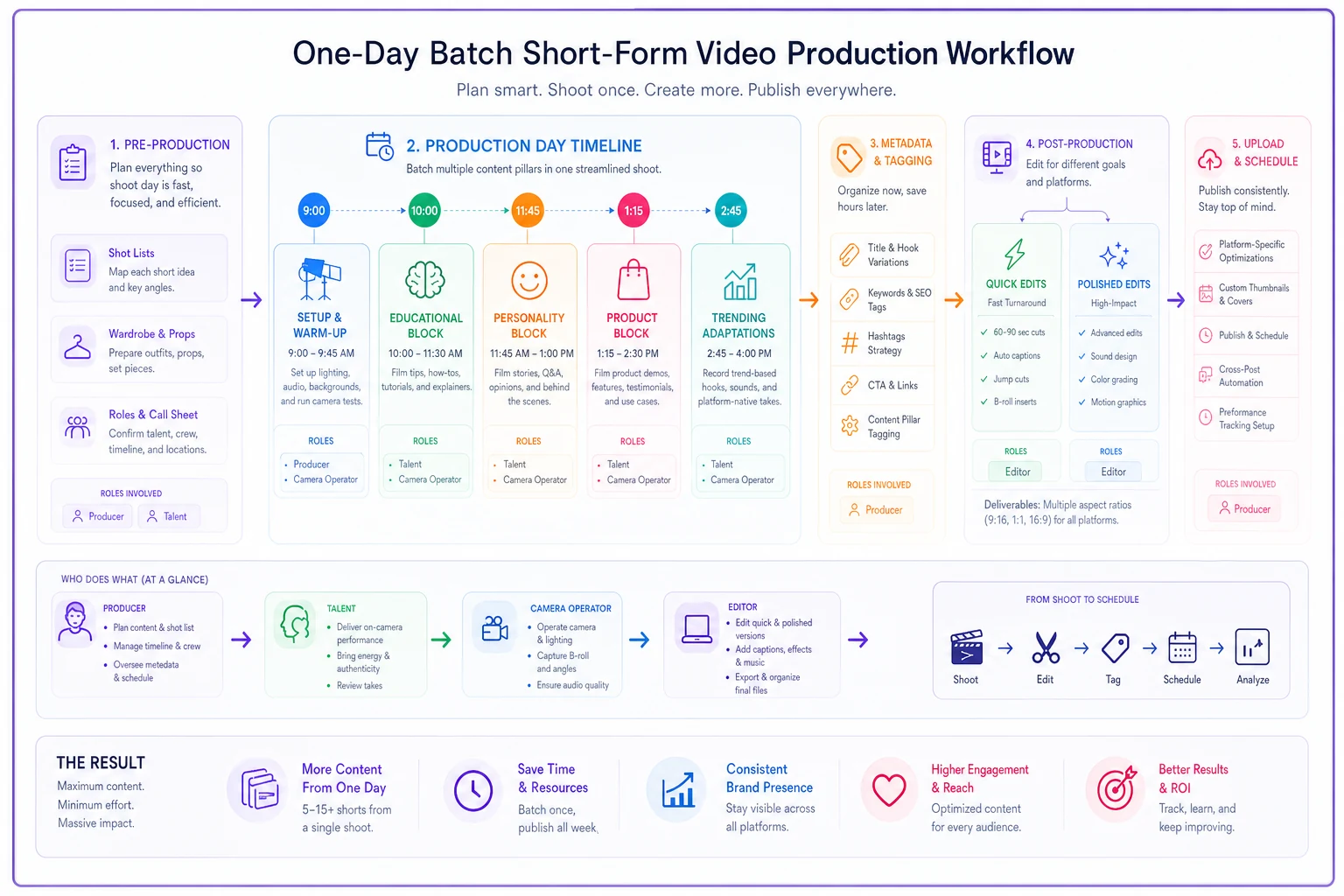
Batch shoots are predictable when you treat each block as a mini-project with clear inputs and outputs. End the day with backups and notes so nothing gets lost.
The metadata system that prevents chaos
Raw footage without organization is worthless. You need a tagging system that makes finding, editing, and repurposing clips effortless months later.
Every clip gets tagged immediately:
-
Concept category (educational, entertainment, product, culture)
-
Platform priority (TikTok-first, Instagram-first, etc.)
-
Duration bucket (under 30s, 30-60s, 60s+)
-
Talent featured
-
Location/background
-
Trending audio used (if applicable)
-
Publishing window (immediate, evergreen, seasonal)
Do the tagging on the shoot day while footage is fresh to avoid hours of searching later.
This takes an extra 20 minutes at the end of shoot day but saves hours during editing and scheduling. When you need a 30-second educational clip for TikTok next Tuesday, you find it in seconds instead of scrubbing through hours of raw footage.
Post-production workflow that scales
Editing is where most batch productions fall apart. Teams shoot 40 pieces of content, then try to perfectly edit each one, burn out after completing maybe 10 clips, and the rest sits on a hard drive forever.
The 80/20 editing approach
Not every clip needs serious post-production. Short-form content often performs better with authentic, lightly edited footage. Here's a distribution that works:
Quick edits (80% of content):
-
Basic cuts only
-
Simple captions
-
Platform watermarks
-
Standard color correction preset
-
15 minutes per clip maximum
Polished edits (20% of content):
-
Multiple angles/b-roll
-
Advanced transitions
-
Custom graphics
-
Color grading
-
Sound design
-
45-60 minutes per clip
Accepting that most content just needs to be good enough means you actually finish the full batch instead of perfecting five clips while 35 collect dust.
Platform-specific export presets
Stop manually adjusting export settings for each platform. Create presets once, use them forever:
| Platform | Resolution | Frame Rate | Bitrate | Max Length | Format |
|---|---|---|---|---|---|
| TikTok | 1080x1920 | 30fps | 10-12 Mbps | 3 min | MP4/MOV |
| Instagram Reels | 1080x1920 | 30fps | 8-10 Mbps | 90 sec | MP4 |
| YouTube Shorts | 1080x1920 | 30/60fps | 15-20 Mbps | 60 sec | MP4 |
| 1080x1920 | 30fps | 5-8 Mbps | 10 min | MP4 |
Save these in your editing software. One click exports for each platform, no thinking required.
The upload checklist that prevents mistakes
Even with great content, small upload mistakes tank performance. Missing captions, wrong hashtags, forgetting to add a link — these errors compound when you're managing dozens of videos.
Pre-upload verification:
-
[ ] Captions burned in or uploaded separately
-
[ ] Thumbnail selected (not auto-generated)
-
[ ] Description under platform character limit
-
[ ] Hashtags researched and relevant (not just trending)
-
[ ] Link in appropriate field (not just comments)
-
[ ] Location tag if relevant
-
[ ] Collaborators/mentions tagged properly
Post-upload monitoring (first 2 hours):
-
[ ] Video playing correctly
-
[ ] Audio synced properly
-
[ ] Comments enabled
-
[ ] Sharing permissions correct
-
[ ] Cross-posted to other platforms if planned
This checklist lives as a physical printout or a shared digital form. Someone checks it for every single upload. The five minutes it takes prevents hours of fixing mistakes or losing momentum from avoidable technical errors.
Real workflow example: Marketing agency producing daily content
A digital marketing agency with 4 team members needed to maintain daily posting across TikTok, Instagram, and LinkedIn for their agency brand and two client accounts. That's 15 posts per day minimum, or 75 per work week.
Before batch production, they spent roughly 3 hours per day on video — shooting, editing, uploading, commenting. Quality was inconsistent and they frequently missed posting windows.
Tuesday (Production Day):
-
9 AM - 5 PM
Full team shoots 45 clips
-
Roles
Creative director (producer), account manager (talent), designer (camera), intern (logistics/metadata)
-
5 locations within their office building
-
4 wardrobe changes
-
47 clips captured total
Wednesday (Processing Day):
-
Designer
Quick edits on 35 clips (5 hours)
-
Intern
Polished edits on 10 hero pieces (4 hours)
-
Account manager
Descriptions, hashtags, scheduling (3 hours)
Thursday-Monday:
-
Content publishes automatically via scheduler
-
10 minutes daily for comment responses
-
Weekly time investment dropped from ~35 hours to ~22 hours
-
Content consistency improved noticeably
-
Engagement up roughly 40% from more consistent posting cadence
The key wasn't working harder or hiring more people. It was concentrating production into focused blocks instead of spreading it thin across every single day.
Where teams get stuck (and how to push through)
The perfectionism trap
Teams convince themselves every video needs to be perfect before posting. They reshoot clips four times, spend hours debating color correction, and agonize over caption wording. Meanwhile, competitors post daily with iPhone footage and basic edits, building massive audiences through sheer consistency.
The fix: set strict time limits. Quick edits get 15 minutes max. If it's not done, it ships anyway or gets cut. Perfection kills publishing velocity.
Role confusion during shoots
Without clear responsibilities, batch shoots devolve into everyone doing everything poorly. Talent tries to direct, the camera operator suggests content ideas, the producer runs around fixing lights. Chaos.
The fix: written role cards distributed before shooting. Everyone knows exactly what they own — and more importantly, what they don't. Suggestions go in a notebook for next time, not during active production.
The "we'll organize it later" delusion
Teams shoot great footage, dump it all in a folder called "Tuesday shoot," then wonder why editing takes forever. Three months later, nobody remembers what half the clips were supposed to be for.
The fix: metadata tagging happens on shoot day, period. Before anyone leaves, every clip is tagged. Make it a ritual — order pizza, tag while eating, nobody goes home until it's done.
Platform FOMO paralysis
Teams try to fully customize everything for every platform, creating exponential complexity. One concept becomes 5 versions, 45 concepts become 225 edits. The math breaks immediately.
The fix: pick a primary platform for each concept. That platform gets the optimized version. Other platforms get the "good enough" version. Your post-sequencing strategy can help maximize reach without creating unique edits for every destination.
Building your team's batch production system
Start small. Don't attempt 45 clips on your first batch day. Work through this progression:
-
Month 1
Shoot 10 clips, focus on workflow basics
-
Month 2
Scale to 20 clips, add metadata system
-
Month 3
Push to 30+ clips, optimize editing flow
-
Month 4
Full system with 40+ clips, multiple formats
Each month, document what broke and fix it before the next shoot. Your sixth batch production day will look nothing like your first — that's the whole point.
The tech stack that supports scale
You don't need expensive equipment, but you do need reliable systems. Here's what actually matters:
Essential tools:
-
Cloud storage with mobile upload (footage backup)
-
Batch editing software with preset support
-
Scheduling platform that handles video natively
-
Basic project management for shot lists
-
Spreadsheet for metadata (seriously, don't overcomplicate this)
Nice to have:
-
Dedicated editing workstation (speeds up processing)
-
Teleprompter app (reduces retakes)
-
Wireless mics (improves audio without complexity)
-
Ring lights (consistent lighting between locations)
Teams often buy gear before building workflows. That's backwards. Get the workflow right with phones and basic equipment, then upgrade tools to remove specific bottlenecks.
When batch production isn't the answer
Batch production works brilliantly for certain content types and fails completely for others. Worth knowing the difference:
Perfect for batch production:
-
Educational content
-
Product demonstrations
-
Team culture content
-
Evergreen tips
-
FAQ responses
-
Behind-the-scenes footage
Terrible for batch production:
-
Breaking news responses
-
Trending audio participation (if the audio is older than 48 hours)
-
Real-time event coverage
-
Customer testimonials (unless recreated)
-
Spontaneous moments
The smartest teams run batch production for foundation content — roughly 60-70% of their posts — then layer in real-time content as it happens. This hybrid approach maintains consistency without sacrificing relevance.
The compound effect of systematic production
After six months of regular batch production, something shifts. You're not just creating content anymore — you're building a library of reusable assets. That educational clip from month 2 becomes b-roll in month 5. The personality content from month 3 gets recut into a year-end compilation.
More importantly, your team develops muscle memory around the workflow. What took 8 hours in month 1 takes 5 hours by month 6 — not because you're rushing, but because everyone knows their role, decisions are already made, and the process runs on autopilot.
One contact lens company using this system went from posting sporadically (maybe 3 times per week) to publishing 4-5 times daily across platforms. Follower growth jumped from around 200 per month to somewhere between 1,100 and 1,400 per month. The content itself wasn't radically different — they just produced more of it, more consistently, with significantly less stress.
Making batch production sustainable
The biggest risk isn't that batch production won't work. It's that teams burn out from the intensity. A full production day every week is exhausting if you don't build in recovery systems.
Sustainability tactics that actually work:
-
Rotate roles every month. The person on camera this month runs logistics next month. This prevents any one person from burning out on their specific responsibility.
-
Schedule batch days on Tuesday or Wednesday — never Monday or Friday. You need prep time before and processing time after. Monday shoots mean weekend prep. Friday shoots mean weekend editing.
-
Build in failure tolerance. If you only capture 25 clips instead of 40, that's fine. If three clips have audio issues, cut them and move on. The goal is consistency over time, not perfection every single week.
-
During high-energy shoots, capture 5-10 extra evergreen clips. These become your backup when a future shoot gets cancelled or underperforms.
These tactics keep the system sustainable so you can keep batch production regular without burning out the team.
The path forward
Batch short-form video production isn't about working harder or buying better equipment. It's about building operational systems that turn one focused day into weeks of content. The teams succeeding with short-form video aren't more creative or better funded — they just have better workflows.
Start with your next production day. Pick 10 concepts, assign clear roles, and follow the blueprint. Don't aim for perfection, aim for completion. Edit quickly, tag thoroughly, and schedule everything before you second-guess yourself.
The distance between sporadic posting and daily content isn't talent or budget. It's operational structure. Build the system, trust the process, and watch the library grow week after week.
The compound effect becomes obvious after a few months. While other teams scramble daily for content ideas, you're pulling from a library of pre-shot, pre-edited clips. The same logic applies when you turn long-form content into a month-long social calendar — except with video, the engagement impact tends to be even more pronounced.
Ready to amplify your brand’s voice?
Join 2,500+ marketers using Postyly to save time, boost engagement, and grow their audiences effectively.