

Most social teams treat accessibility like fire insurance—something they know matters but handle inconsistently until something breaks. The real operational headache shows up when you're producing 200+ pieces of content monthly across platforms and suddenly realize half your video captions are auto-generated garbage and your alt-text reads like "image of person."
The accessibility gap in scaled social operations isn't about not caring. It's about workflow breakdowns when volume hits critical mass.
The hidden cost of retroactive accessibility fixes
A mid-sized fashion brand learned this lesson the hard way. They'd grown their social output from 40 posts monthly to nearly 300 across Instagram, TikTok, LinkedIn and X. Everything seemed fine until an accessibility audit revealed that 68% of their visual content had either missing or useless alt-text, and their video captions averaged 42% accuracy on industry terms.
The retrofit project took three people six weeks. Not because writing alt-text is hard, but because they had to:
-
Track down original assets scattered across seven different folders
-
Verify product names and colorways from discontinued lines
-
Re-export videos with burned-in captions
-
Update platform-specific descriptions retroactively
-
Document which posts had been fixed where
That's roughly $18,000 in labor for something that should've been handled upfront. And they still couldn't fix everything—Instagram Stories older than 24 hours can't be edited, and several viral TikToks stayed inaccessible permanently.
Why traditional accessibility guidelines break at scale
Standard accessibility advice assumes you have time to craft each piece thoughtfully. Write descriptive alt-text. Review auto-captions. Consider screen reader flow. All solid principles that completely collapse when your content calendar looks like a production line.
Stop managing your social media the hard way.
Postyly helps you plan, schedule, and analyze every post with precision.
- Multi-platform scheduling
- Real-time engagement tracking
- Automated performance reports
No credit card required
The math doesn't work. If you're publishing 50 pieces weekly and spend just 3 minutes on accessibility per post, that's 2.5 hours of purely administrative work every week. Factor in context-switching between platforms, back-and-forth with designers, and you're looking at a full day weekly just on accessibility tasks.
What actually happens? Teams default to platform auto-features, copy-paste generic descriptions, or skip accessibility entirely during crunch periods. Not maliciously—operationally.
Building rule-based templates that actually get used
The breakthrough for social media accessibility at scale comes from treating it like any other production constraint: systematize what's repeatable, flag what needs human judgment.
Start with categorizing your content into accessibility archetypes:
Product showcase posts:
-
Primary
[Product name] in [color/variant]
-
Context
[Setting/usage scenario]
-
Details
[Key visible features]
-
Action
[What's happening if video/GIF]
Educational content:
-
Topic
[Subject matter in plain language]
-
Format
[Carousel/video/infographic indicator]
-
Key point
[Main takeaway without jargon]
-
Supporting elements
[Charts/graphics description]
Behind-the-scenes content:
-
Scene
[Location and activity]
-
People
[Role, not names unless public figures]
-
Process
[What's being shown]
-
Relevance
[Why this matters to followers]
These templates become production rules. A beauty brand might have 15 template variations covering everything from tutorial videos to shade comparisons.
Store templates in designers' existing tools to increase adoption.
| Content Type | Template Structure | Time to Complete | Common Mistakes |
|---|---|---|---|
| Product flat lay | [Number] products: [list items clockwise from top], on [surface type] background | 45 seconds | Missing color descriptions, assuming product names are obvious |
| Tutorial video | [Length]-minute tutorial: [end result], using [number] steps with [key products listed] | 90 seconds | Not mentioning visual-only instructions |
| User-generated repost | Repost from [username]: [describe original content using standard template] | 60 seconds | Forgetting to describe since it's "not ours" |
| Meme/trending format | [Meme name] format: [setup description], [punchline description] | 30 seconds | Explaining the joke instead of describing visuals |
The templates live in whatever tool designers already use—not in a separate accessibility document nobody opens.
Automated caption QA that catches what matters
Auto-captioning has gotten better, but it still mangles brand names, industry terms, and anything with deliberate misspelling. The fix isn't manual review of every caption—it's automated QA for what actually matters.
Build a keyword watchlist that flags captions for human review:
-
Brand and product names
-
Industry-specific terms
-
Competitor mentions
-
Price points
-
Technical specifications
-
Cultural references
-
Trending audio descriptions
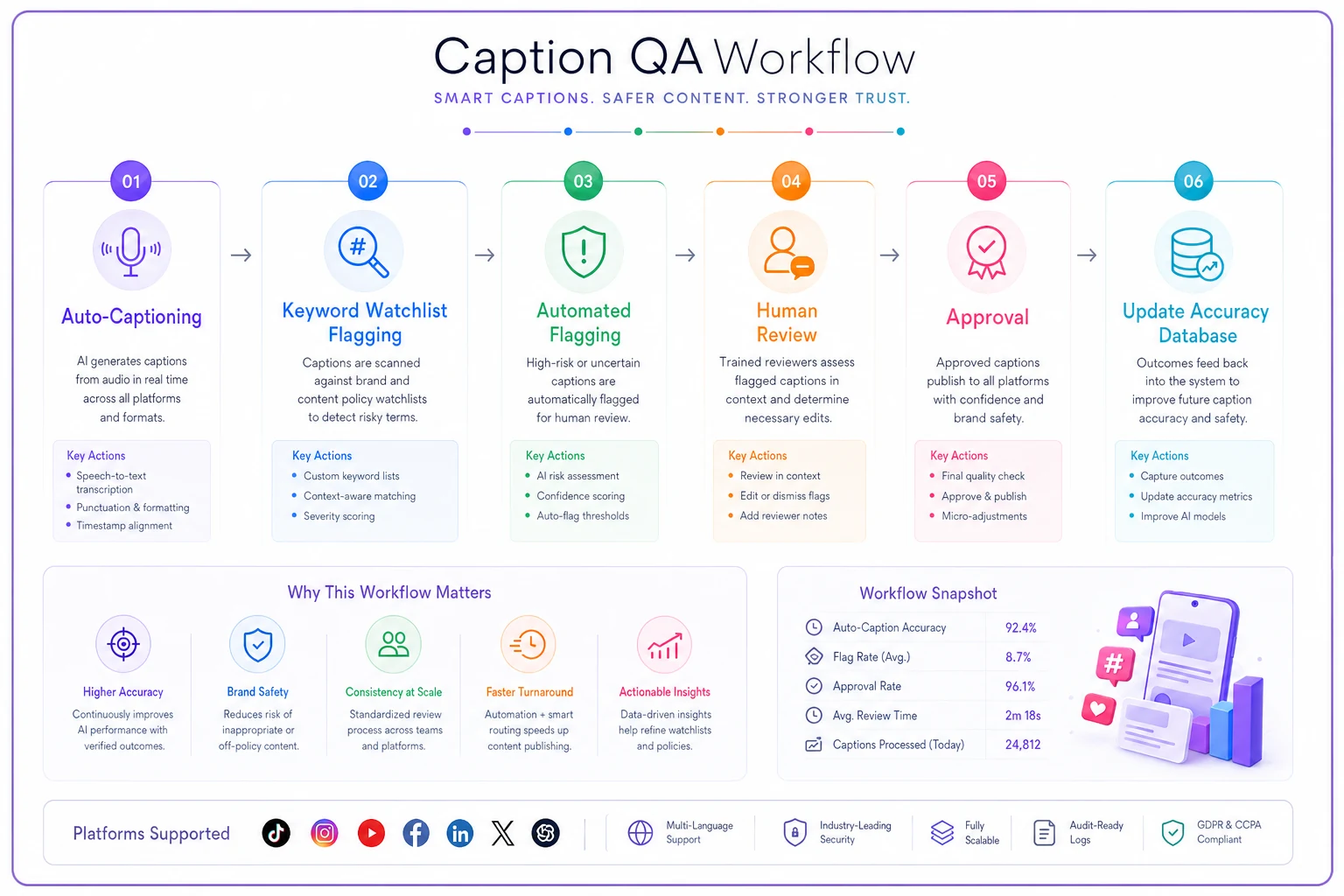
A sustainable workflow looks like:
-
Auto-caption everything initially
-
Script flags videos containing watchlist terms
-
Human reviews only flagged content
-
Approved captions get added to the accuracy database
-
Particularly complex videos get pre-written scripts
Quick visual of the caption QA workflow:
One retail brand cut their caption review time by around 70% using this approach while improving accuracy on critical terms from roughly 60% to 94%. They spent time fixing what mattered—product names and prices—rather than chasing perfect grammar on every single video.
The editor handoff that preserves accessibility work
The biggest workflow breakdown happens between creation and publication. A designer adds thoughtful alt-text in Figma, but the social media manager doesn't see it when downloading final assets. Video editor includes captions, but they get stripped during platform upload.
Fix this with explicit handoff rules:
For static images:
-
Alt-text travels with the file (in metadata or filename)
-
Backup exists in the project brief
-
Platform-specific variations documented
-
Character count pre-checked for each platform
For videos:
-
SRT files attached to every video asset
-
Burned-in captions for Stories/Reels
-
Closed caption files for YouTube/LinkedIn
-
Transcript available for blog repurposing
For multi-slide content:
-
Reading order clearly marked
-
Relationship between slides explained
-
Overall narrative provided for context
The handoff document becomes the accessibility source of truth. When that Black Friday push has you scheduling 30 posts in two hours, you're copying from a validated source—not making it up on the fly.
Lightweight legal considerations that prevent problems
Accessibility lawsuits against brands have increased roughly 300% over the past three years. You don't need a legal degree, but you do need operational awareness of common triggers.
High-risk content patterns:
-
Sales or promotional content without accessible descriptions
-
Video ads without captions (especially on paid media)
-
Interactive elements (polls, quizzes) without text alternatives
-
Time-sensitive information only in images
-
Navigation instructions only in video format
A practical legal safety checklist:
-
Screenshot your accessibility workflow documentation
-
Keep logs of caption accuracy checks
-
Document your template system and training
-
Save before/after examples of improvements
-
Track percentage of accessible content monthly
This isn't about perfect compliance—it's about showing good faith effort and continuous improvement. Most legal issues come from obvious negligence, not edge cases.
Platform-specific quirks that break standard workflows
Each platform handles accessibility differently, and these differences compound at scale. Instagram alt-text has a 100-character limit that nobody mentions. TikTok captions can be edited after posting, but only on mobile. LinkedIn's auto-captions are actually decent, while Twitter's are borderline unusable.
Operational adjustments by platform:
Instagram:
-
Alt-text limited, focus on key elements
-
Stories need burned-in captions
-
Reels captions can be edited post-publish
TikTok:
-
Auto-captions generally solid for clear speech
-
Text-on-screen should be read aloud
-
Trending audio needs context description
-
Caption editing only via mobile app
LinkedIn:
-
Native video captions quite accurate
-
Document posts need alternative formats
-
Article previews should include summary
-
Polls require text explanation
YouTube:
-
Auto-captions good baseline but need review
-
Multiple caption tracks for languages
-
Description field can provide full context
-
Chapters improve navigation
Build these quirks into your production calendar. If Tuesday is TikTok batch day, caption review happens on mobile. LinkedIn videos get uploaded with auto-captions enabled. Instagram carousels get individual alt-text during design, not at publishing.
Measuring what moves the needle
Tracking accessibility metrics doesn't mean counting every alt-text character. Focus on metrics that indicate systematic improvement:
Weekly operational metrics:
-
Percentage of videos with reviewed captions
-
Alt-text coverage rate by content type
-
Time spent on accessibility tasks
-
Number of retroactive fixes needed
Monthly quality metrics:
-
Caption accuracy spot-checks (sample 10%)
-
Alt-text usefulness scoring (does it stand alone?)
-
Accessibility-related comments/feedback
-
Completion rate of template usage
Quarterly strategic metrics:
-
Engagement from users with accessibility needs
-
Legal compliance audit results
-
Team training completion
-
Process improvement implementation
A sustainable program shows steady improvement, not perfection. Going from 30% to 70% accessible content matters more than getting stuck trying to perfect the last 10%.
The AI automation opportunity in accessibility workflows
This is where AI-powered operational software shifts accessibility from a burden to a baseline. Smart automation handles the repetitive parts while preserving human judgment where it actually matters.
AI assists with:
-
Initial alt-text generation from image recognition
-
Caption quality scoring and error detection
-
Template selection based on content type
-
Bulk processing of similar content
-
Translation of accessibility elements
-
Pattern recognition for missing elements
The key is augmentation, not replacement. AI generates the first draft of alt-text for 200 product photos, humans refine the 20 that need real nuance. Auto-captions get pre-screened for accuracy, humans fix only the flagged segments.
One platform reduced accessibility workflow time by around 65% while actually improving quality scores. The automation handled the volume, people handled the judgment calls.
Beyond compliance: when accessibility drives engagement
Most teams miss this part: accessible content often performs better for everyone. Captions increase video watch time by around 12% on average. Descriptive alt-text improves SEO. Clear visual descriptions help anyone watching without sound.
A home décor brand found their accessible posts had roughly 24% higher engagement rates. The forced clarity of writing alt-text made their captions sharper overall. Describing visual elements helped customers understand product details better. Captions made their videos shareable in sound-off environments—which is most of social media.
Accessibility at scale isn't just about avoiding lawsuits or doing the right thing, though both matter. It's about operational discipline that benefits everyone. When you build systems for edge cases, you tend to improve the entire workflow.
The path forward isn't perfection on day one. Start with templates for your highest-volume content types. Add automated QA for your biggest risk areas. Build handoff processes that preserve work already done. Track what matters, improve consistently.
Retroactive fixes cost far more than proactive processes—in time, money, and the posts you simply can't fix after the fact. Your content team doesn't need to become accessibility experts. They need operational systems that make the right thing the easy thing, especially when volume makes individual attention impossible.
Ready to amplify your brand’s voice?
Join 2,500+ marketers using Postyly to save time, boost engagement, and grow their audiences effectively.