



There's a specific kind of failure that hits content teams around the second or third year of running a serious social program. You've built a library of posts that genuinely performed — the carousel that pulled 400 saves, the tips thread that keeps getting shared. Someone decides it's time to "bring the winners back for the holidays." So an intern grabs the old post, changes the date at the bottom, and reschedules it.
Then two things happen. Half the audience remembers it verbatim and comments "you posted this last year." The other half sees a reference to a product bundle that got discontinued in March. The post underperforms the original by a wide margin, and now leadership assumes "recycling doesn't work" — when the actual problem was that nobody built a system for it.
A seasonal evergreen social refresh isn't reposting. It's a controlled reintroduction with a taxonomy that tells you what to change, selection rules that tell you which posts qualify, scheduling windows that tell you when, and an A/B checklist that keeps you from quietly breaking what already worked.
Why straight reposting quietly fails
The instinct to repost makes sense. The content proved itself. But performance data on an old post is only useful if the conditions that produced it still exist, and they rarely do a full year later.
A typical example: a B2B SaaS team had a "year-end planning checklist" post that did well in December two years running. The third year they reposted it unchanged. It flopped — roughly a third of the original reach. When they dug in, three things had shifted: the platform algorithm now favored native video over static carousels, the post referenced a pricing tier that no longer existed, and a competitor had published an almost identical checklist in October that saturated the topic.
None of those were content-quality problems. They were freshness and context problems. Seasonal content doesn't decay because the idea got worse. It decays because the packaging and the context aged around it. Your refresh system exists to update the packaging while protecting the core idea.
The refresh taxonomy: four levels of change
Not every recycled post needs the same amount of work. The mistake teams make is treating refresh as binary — either "repost as-is" or "rewrite from scratch." There are four distinct levels, and picking the wrong one wastes hours or produces something stale.
Stop managing your social media the hard way.
Postyly helps you plan, schedule, and analyze every post with precision.
- Multi-platform scheduling
- Real-time engagement tracking
- Automated performance reports
No credit card required
| Refresh level | What you change | Effort | Best for |
|---|---|---|---|
| Copy tweak | Hook line, opening 2 lines, dates, CTA, any outdated references | 10–15 min | Posts under ~14 months old that still perform |
| Format swap | Same core message, new container (carousel → video, thread → single graphic) | 1–2 hrs | Posts where the idea is strong but the format has aged relative to the algorithm |
| New hook, same body | Rewrite the opening and framing; keep the substance and structure | 30–45 min | Posts that saturated their original angle but the info is still valuable |
| Full rebuild | New examples, new data, new visuals, same underlying topic | half day+ | Posts older than ~2 years or where the facts changed |
The taxonomy matters because it forces a decision before work starts. What tends to happen without it is that people default to full rebuilds out of guilt — they feel like recycling is lazy, so they overcompensate and rebuild everything, which kills the whole economic benefit of recycling.
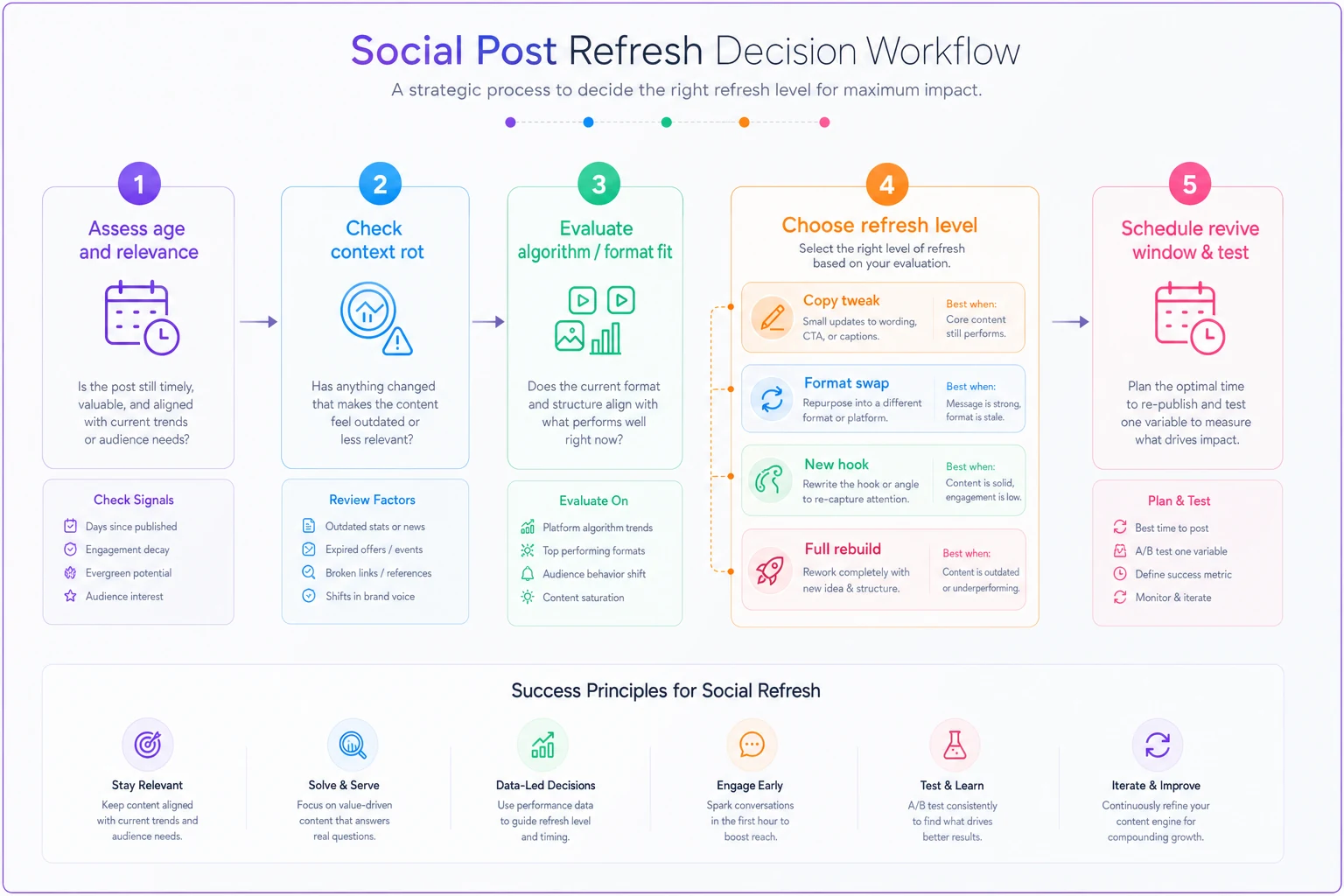
A quick gut check: if you're doing more than a format swap, you should be able to name why the lighter levels wouldn't work. "It's old" isn't a reason. "The screenshot shows an interface we redesigned" is.
Selection and pruning: which posts actually earn a spot
This is where most refresh efforts go sideways. Teams pull their "top posts," but top by what metric, and over what window? A post can have huge lifetime reach and be completely dead for its actual purpose.
-
Pull candidates by seasonal relevance first, performance second. Filter to posts whose topic maps to the upcoming window (back-to-school, tax season, holiday gifting, new-year planning). A brilliant post about summer hiring is irrelevant in November regardless of how well it did.
-
Score the survivors on evergreen strength. How much of the post depends on time-sensitive facts? A post that's 80% timeless framing and 20% dated stats is a strong candidate. A post that's mostly "here's what's trending right now" is a poor one — that content was never evergreen, it just performed once.
-
Check for saturation and repetition risk. How many times has this exact angle run? Anything you've published more than twice in 18 months needs a new hook, not a copy tweak. Audiences forgive a good idea coming back. They don't forgive the same sentence three times.
-
Prune anything with unfixable context rot. If the post references discontinued products, old branding, a partner you no longer work with, or a claim that's since become questionable — and fixing it would gut the post — cut it. Don't drag dead references into a new season.
If you already run a scoring approach for your library, this layers cleanly on top of a content prioritization rubric for evergreen social posts. The rubric tells you what's worth keeping alive at all; the seasonal filter tells you what's worth reviving right now.
Prioritize posts with evergreen framing even if their recent performance is modest — they recycle more reliably than one-hit viral posts.
One pattern worth flagging: the posts that recycle best are usually your second-tier performers, not your all-time viral hits. The viral posts are the ones your audience actually remembers, which means they're the most likely to trigger "didn't you already post this." The solid-but-not-legendary posts got real engagement without burning themselves into anyone's memory. That's the sweet spot.
Scheduling windows: timing the reintroduction
The wrong reintroduction date does more damage than the wrong copy. Reintroduce too early and you're competing with everyone's first wave of seasonal content. Too late and the moment has passed — the post reads as behind.
The practical rule: lead the season by the length of the audience's decision cycle, not the calendar date of the event. Holiday gifting content shouldn't drop when the holiday hits — it should drop when people start deciding, which for most consumer categories is 4–6 weeks out. B2B planning content leads even further, sometimes 8 weeks, because budget conversations start early.
A workable scheduling approach:
-
Set a "revive-by" and "retire-by" date for each seasonal candidate. A post has a window where it's relevant. Outside that window it should not be schedulable, so nobody accidentally runs your tax-season post in June.
-
Stagger identical-topic revives at least 3–4 weeks apart if you're bringing back multiple posts on the same seasonal theme. Clustering them makes the recycle obvious.
-
Never revive a post on the same weekday-and-slot it originally ran. Small thing, but audiences have rhythm memory. Same slot plus same topic reads as a rerun even when the copy changed.
Teams that already turn long-form content into a month-long social calendar have a natural advantage here — the mapping that generated the calendar the first time is exactly what you tap to generate the refreshed version, so you're not starting from a blank page each season.
When this makes sense — and when it doesn't
Recycling is a leverage move, not a universal one.
When a seasonal refresh actually makes sense:
-
You have at least 6–8 months of published history to draw from
-
The topic has genuine seasonal recurrence (it comes back every year for real reasons)
-
The original post's core idea is still true and still useful
-
You have the bandwidth to do at least a copy tweak — never a raw repost
When it's a bad idea:
-
The post's whole value was tied to a specific moment (a launch, a news event, a one-time promo). Those don't recycle; they expire.
-
Your audience turnover is low and your posting cadence is high — if the same people see everything and you post daily, they'll notice repeats faster.
-
The facts in the post have shifted and you don't have time to rebuild properly. A half-updated post with one stale number reads worse than no post.
Who should skip this entirely for now: brand-new accounts with under six months of content, and teams where nobody owns the taxonomy decision. If the "which refresh level" call is made ad hoc by whoever grabs the post, you'll get inconsistent results and won't be able to tell whether recycling actually works.
The A/B checklist: reintroducing safely
The point of testing a revive isn't just to see if it works — it's to protect yourself from silently degrading a proven asset. When you bring back a strong post with changes, you want to know the changes helped, not hurt.
The honest constraint: you can't run a clean A/B on a revived post against its own original, because the original ran under different conditions in a different season. What you can do is test the refresh variables against each other in the new window.
-
- [ ] Confirmed the refresh level using the taxonomy, with a stated reason if it's above a format swap
-
- [ ] Removed all context rot — dates, discontinued references, old branding, dead links, outdated stats
-
- [ ] Rewrote the hook even if the body stays — the opening is what signals "fresh" or "rerun" to the algorithm and the reader
-
- [ ] Checked saturation — this exact angle hasn't run more than twice in 18 months
-
- [ ] Set revive-by and retire-by dates so it can't run outside its window
-
- [ ] Avoided the original's exact slot and staggered from same-theme revives
-
- [ ] Defined one variable to test — hook version, format, or CTA — not three at once
-
- [ ] Set a holdout or comparison baseline — either a fresh post in the same window or a second hook variant, so you can read the result cleanly
-
- [ ] Wrote down the decision rule — what result means "promote this into next season's rotation" vs "retire it"
That last item is the one people skip, and it's the one that makes the whole system compound. If you don't record why a revive worked or didn't, next year's team relearns the same lessons from scratch.
A real scenario
A regional home-goods retailer with a two-person social team had a "small space organizing" carousel that performed well every January — new-year-declutter energy. They'd been reposting it lightly each year and watching it fade: strong the first January, decent the second, weak by the third.
Instead of reposting a fourth time, they ran it through the taxonomy and landed on a format swap plus new hook. Same organizing principles, rebuilt as a short walkthrough video with an updated opening line. They also moved the drop from early January — when the topic was already saturated — to the last week of December, ahead of the resolution wave. And they A/B'd two hooks against each other rather than guessing.
The revived version pulled meaningfully better than the previous January's tired repost — roughly double the saves and a noticeable lift in shares. Because they'd written down which hook won and why, the next seasonal candidate took maybe 40 minutes to prep instead of a full afternoon. The content wasn't new. The system around it was.
Bringing it together
The reason recycling gets a bad reputation isn't that recycled content is inherently weak. It's that most teams recycle without a taxonomy, without selection rules, without timed windows, and without any way to check whether their changes helped. So they either post something stale or overbuild every revive into a full project, and both outcomes make recycling look like a losing trade.
Build the four-level taxonomy so the effort matches the post. Filter candidates by seasonal relevance before performance, and prune anything with context rot you can't fix cheaply. Time the reintroduction to the decision cycle, not the event. Run the A/B checklist so every revive teaches you something you can reuse next season.
Do that consistently and your best content stops being a one-time asset and starts being a rotation you can actually lean on — fresh enough that nobody notices the recycle, reliable enough that you're not building every seasonal calendar from zero.
Do that consistently and your best content stops being a one-time asset and starts being a rotation you can actually lean on — fresh enough that nobody notices the recycle, reliable enough that you're not building every seasonal calendar from zero.
Ready to amplify your brand’s voice?
Join 2,500+ marketers using Postyly to save time, boost engagement, and grow their audiences effectively.