


Most social tool procurement goes sideways in the same quiet way. The demo looks incredible. The feature list checks every box your director scribbled down. The sales engineer pulls up a dashboard that practically glows. Six months later your team is pasting CSVs into a spreadsheet at 11pm because the "seamless integration" never actually seamed to anything you own.
The problem isn't that teams pick bad tools. It's that they pick tools based on what the tool does in isolation, instead of how it behaves inside the specific tangle of systems, permissions, and approval flows your team already lives in. A scheduling platform that's flawless for a 4-person agency can create three new bottlenecks for a 30-person brand team with regional approvers.
This piece is a procurement checklist built around operational fit. Not a feature comparison. The goal is to help you catch the stuff that only shows up after you've signed — identity handling, data export reality, approval routing, rate limits — while you still have leverage during the RFP.
Why feature lists lie to you
Feature lists describe capabilities in a vacuum. "Supports multi-brand workspaces." Great. But does it support your version of multi-brand, where Brand A approvers can't see Brand B drafts, and the paid team needs read-only access to organic performance without touching the publishing queue?
A typical failure looks like this. A mid-size retail marketing team buys an analytics platform that "integrates with Meta, TikTok, and your data warehouse." On paper, done. In practice, the warehouse connector only syncs once every 24 hours, it drops UTM parameters longer than 255 characters, and it can't backfill more than 90 days. None of that was a lie in the demo. It just never came up because nobody asked the operational question underneath the feature.
The pattern that keeps showing up: procurement scores vendors on presence of features (yes/no) instead of behavior of features (how, how fast, with what limits, under whose permissions). A yes/no column makes every vendor look roughly equal. The behavior underneath is where they diverge wildly.
The whole checklist below is built to force behavior questions into the open before contracts get signed.
The operational RFP: questions that actually separate vendors
Your RFP should read less like a wishlist and more like an interrogation of how the tool behaves inside a real workflow. Here's the core structure organized by the four areas where integrations actually break.
Stop managing your social media the hard way.
Postyly helps you plan, schedule, and analyze every post with precision.
- Multi-platform scheduling
- Real-time engagement tracking
- Automated performance reports
No credit card required
1. Identity and access
-
How do you handle SSO, and specifically — do you support SCIM provisioning or is user management manual?
-
When someone leaves, how fast does their access actually revoke across all connected workspaces?
-
Can permissions be scoped per-brand, per-channel, and per-function (publish vs. view vs. approve) independently?
-
What happens to content a departed user "owned"? Does it orphan?
2. Data in and data out
-
What's the real sync frequency for each connected source — not the max, the default?
-
What's the data retention window, and can we export historical data in full if we leave?
-
Are exports available via API, scheduled file drop, or only manual download?
-
Which fields get dropped or truncated during ingestion? (Make them answer specifically.)
3. Workflow and approvals
-
Can approval routing be conditional (e.g., paid creative over a spend threshold needs legal)?
-
Does the tool enforce versioning, or just store the latest file?
-
Can we mirror our existing RACI, or does the tool impose its own roles?
4. Platform limits and resilience
-
What are the API rate limits, and what happens when we hit them during a launch day spike?
-
When a social platform changes its API (they do, constantly), what's your typical patch turnaround?
-
Where does the tool fail silently vs. throw a visible error?
Here's a simple workflow visualization of the RFP and integration test.
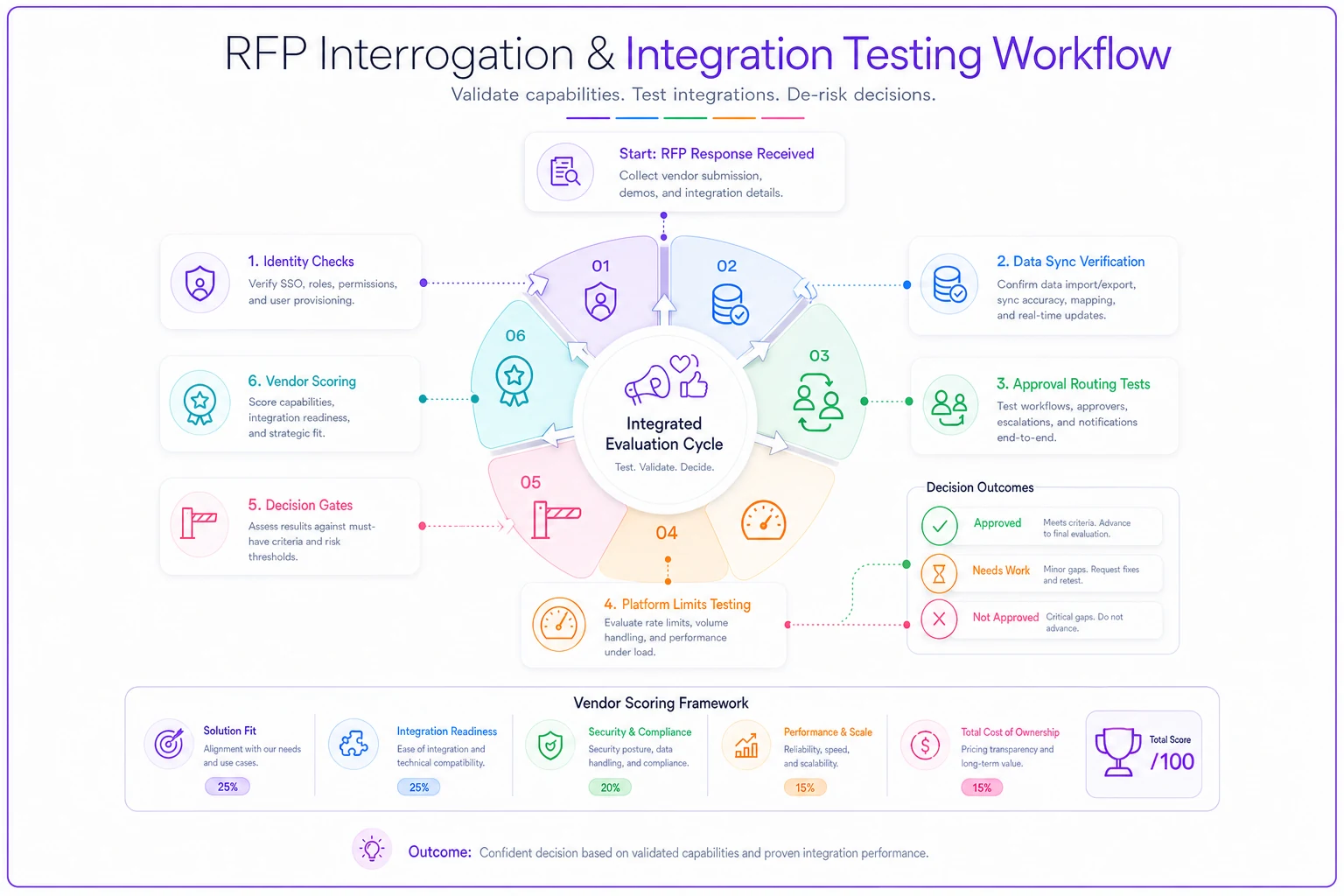
That last question matters more than people realize. Silent failures — a post that didn't publish, a metric that stopped updating — cost far more than loud ones, because nobody notices until a stakeholder does.
An evaluation rubric built on fit, not flash
Scoring matters because it forces your team to argue about trade-offs before the decision instead of after.
Here's a rubric weighted toward operational reality. Notice that raw feature count is a small slice.
| Evaluation area | Weight | What a strong answer looks like |
|---|---|---|
| Identity & access control | 20% | SCIM, granular per-brand scoping, fast revocation |
| Data export & portability | 20% | Full historical export via API, no vendor lock-in |
| Integration behavior (sync, limits) | 20% | Real sync frequency documented, clear rate-limit behavior |
| Approval & workflow mapping | 15% | Conditional routing, enforced versioning |
| Reliability & failure visibility | 15% | Visible error states, documented patch cadence |
| Feature coverage | 10% | Covers core needs (not every nice-to-have) |
The uncomfortable insight here: the vendor with the longest feature list often scores worst on this rubric. Feature-maximalist products tend to under-invest in the boring plumbing — access control, export, failure handling. The 10% feature weight isn't a typo. If a tool nails the other 90% and covers your real must-haves, the extra bells rarely matter.
One more thing on scoring — have the people who'll actually operate the tool fill out the rubric, not just the person approving the budget. The gap between how a director scores a demo and how an operator scores the same demo is usually enormous.
Integration-readiness: the part everyone skips
Before you score a single vendor, document what you're integrating into. Half of failed integrations fail because the buyer never mapped their own environment. The tool was fine. The receiving end wasn't ready.
Here's a readiness checklist to run on your own stack first:
-
[ ] We have a current inventory of every system this tool must connect to (warehouse, DAM, ad accounts, CRM, approval tools)
-
[ ] We know which of those systems have stable, documented APIs vs. flaky ones
-
[ ] We've confirmed who owns credentials for each connected account (and that it's not one person's personal login)
-
[ ] We've defined our taxonomy and tagging rules so incoming data lands clean
-
[ ] We know our required data retention and compliance constraints
-
[ ] We've identified the one person who'll own the integration post-launch
Standardize tags and naming before vendor ingestion to avoid messy data downstream.
The taxonomy point is where a lot of teams get bitten. If your tags, campaign naming, and metadata aren't standardized before the tool starts ingesting, you get a clean pipe pouring messy data into a clean warehouse. Getting the naming and metadata foundation right first is why a solid rights-aware content taxonomy pays off long before any vendor shows up. Same logic on the data side — if your analytics data architecture already defines normalization and join rules, you can test a vendor against real requirements instead of vague ones.
A real scenario
A regional consumer brand team — around 18 people, four sub-brands — was replacing a publishing and analytics tool. The RFP shortlist had two finalists. Finalist A had more features and a flashier reporting suite. Finalist B was plainer but scored higher on access control and data export.
The team almost went with A. The dashboard was genuinely better. But during a scripted integration test, A's warehouse connector turned out to sync once daily and silently dropped campaign tags over a certain character length. For a team reconciling paid and organic spend weekly, that meant someone rebuilding reports by hand every single week.
They ran the numbers. The manual reconciliation would've eaten roughly 6–8 hours a week across two analysts — somewhere in the $18k–$22k range annually in loaded time, not counting the reporting errors that creep in when humans stitch spreadsheets. They went with Finalist B. Reporting was less pretty, but the data arrived clean and exports worked. About two quarters in, the time savings were obvious enough that nobody missed the fancier dashboard.
The lesson wasn't "pick the boring tool." It was that the integration test caught a behavior the demo hid, and a rubric that weighted export and sync correctly made the trade-off legible before anyone signed anything.
Contract clauses that protect operational fit
Procurement usually treats contracts as a legal formality after the decision is already made. That's backwards. The contract is where you lock in the operational promises the demo made but the feature list never captured. A few clauses worth insisting on:
-
Data portability clause — You can export all your data, including historical records, in a standard format within a defined window after termination, at no extra charge. This kills lock-in.
-
Sync and uptime commitments — Documented sync frequency and uptime, with defined remedies if they slip. Vague "best efforts" language is a red flag.
-
API-change support SLA — When a social platform changes its API, the vendor commits to a patch timeline. Put a number on it.
-
Access control guarantees — The permission scoping you were shown in the demo is contractually available on your plan tier. (Vendors love to demo enterprise-tier features to mid-tier buyers.)
-
Failure notification clause — The vendor must surface, not silently swallow, integration and publishing failures.
The one that saves the most pain is portability. Teams that skip it discover the real cost of a bad tool at the worst possible moment — when they're trying to leave and two years of data is being held hostage.
When this rigor makes sense — and when it's overkill
This level of procedure isn't free. It adds weeks to a buying cycle. For a solo creator or a tiny team buying a $30/month scheduler, running a full RFP and integration test is genuinely a waste of time. Pick something popular, try it, move on.
The full process earns its keep when you're connecting the tool to a data warehouse or CRM, when you have more than one brand or approver layer, when multiple teams depend on the same data, or when switching later would be expensive and disruptive. Basically — the more systems and people downstream of the tool, the more a bad integration fit compounds.
Who should not do this: anyone treating it as a box-checking ritual. A rubric nobody argues over and an integration test nobody actually runs are just paperwork. The value is in the friction — the questions that make a vendor squirm, the test that exposes the silent failure. Skip the friction and you've just made your bad decision slower.
A social media vendor procurement checklist isn't about scoring features harder. It's about shifting the whole evaluation from "what can this tool do" to "how will this tool behave inside my specific operation." Feature lists hide the plumbing. Operational questions expose it.
Map your own environment first. Score for access, export, sync behavior, and failure visibility — not demo polish. Run a real integration test before signing. And put the operational promises into the contract, because that's the only place they're enforceable. Do that, and the tool you pick will be the one that actually works on the Tuesday you need it most — not the one that looked best in the demo on a Thursday.
Ready to amplify your brand’s voice?
Join 2,500+ marketers using Postyly to save time, boost engagement, and grow their audiences effectively.