


Managing user-generated content feels straightforward until you're tracking 2,000+ submissions across multiple campaigns and someone from legal asks "do we have rights to use this photo from Q2 in next year's Super Bowl ad?" That's when most teams realize their spreadsheet system just broke.
The difference between teams that can confidently repurpose UGC and those stuck in approval limbo usually comes down to three things: how they capture metadata during intake, what their release language actually says, and whether their archival rules connect assets to specific campaign permissions.
Why standard release forms create operational chaos
Most marketing teams inherit release forms from legal that read like software terms of service. Technically protective. Operationally useless.
A typical scenario: your summer campaign generates 400 UGC submissions. Six months later, paid media wants to use the top performers in Q1 ads. Now someone has to manually review 400 release forms to check if paid usage was included. Half have different versions because legal updated the template mid-campaign. Another chunk have handwritten modifications nobody photographed clearly.
The real cost isn't just the time spent searching. Teams end up abandoning perfectly good content because nobody can confirm usage rights fast enough to hit campaign deadlines.
Release language needs to work operationally, not just legally — standardized fields that can be tracked in metadata, clear usage categories that match how your team actually works, and version control that doesn't require a law degree to follow.
Building an intake metadata schema that scales
Teams that actually scale UGC programs capture structured metadata at the moment of submission, not weeks later when someone finally gets around to organizing files.
Stop managing your social media the hard way.
Postyly helps you plan, schedule, and analyze every post with precision.
- Multi-platform scheduling
- Real-time engagement tracking
- Automated performance reports
No credit card required
Here's what needs tracking:
Core submission data:
-
Submission ID (unique identifier)
-
Creator name and handle
-
Submission date and time
-
Campaign/contest identifier
-
Platform source (Instagram, TikTok, email submission)
-
Original content URL or file location
Rights and permissions:
-
Release form version number
-
Specific usage rights granted (organic social, paid ads, website, print, broadcast)
-
Geographic restrictions if any
-
Time limitations (perpetual vs. time-bound)
-
Modification permissions (can you crop, add text, change colors)
-
Attribution requirements
Content classification:
-
Content type (photo, video, text)
-
Products featured
-
People visible (yes/no, number of people)
-
Location identifiable (yes/no)
-
Brand elements present
-
Competitor products visible
Operational tracking:
-
Review status (pending, approved, rejected)
-
Reviewer name and date
-
Rejection reason if applicable
-
Internal notes
-
Performance metrics once published
Store the metadata with the asset file itself so it never gets separated from the content.
The critical part: this metadata lives with the asset permanently, not in a separate spreadsheet that disappears when someone leaves the company.
Release language that operations teams can actually implement
The most functional release language follows a modular structure where creators explicitly opt into specific usage types. Instead of blanket "all rights forever" language that creators won't sign, break permissions into clear categories:
Organic social media usage
-
Post on brand's social channels
-
Include in Stories and Reels
-
Use as profile or cover images
-
Share to brand's other social accounts
Paid advertising usage
-
Social media ads on original platform
-
Cross-platform social ads
-
Display advertising
-
Email marketing
-
Print advertising
-
Broadcast/TV (often a separate tier)
Website and owned media
-
Product pages
-
Homepage features
-
Blog content
-
Email newsletters
-
Mobile apps
Modifications allowed
-
Cropping and resizing
-
Adding brand logos or text
-
Color correction
-
Creating compilations
-
Audio replacement (for videos)
Each category becomes a checkbox in your intake form. Creators know exactly what they're agreeing to, and your team can filter content by available permissions. When those permissions automatically populate your asset metadata, there's no manual checking required.
Approval gates that prevent expensive mistakes
Even with clean permissions, you need lightweight approval gates that catch problems before content goes live.
Initial submission review (24–48 hours):
-
Rights confirmation matches submission
-
Content meets brand guidelines
-
No visible competitor products
-
No inappropriate content
-
Technical quality acceptable
Pre-publication check:
-
Usage type matches granted permissions
-
Campaign still active
-
No legal holds
-
Attribution requirements confirmed
Escalation triggers:
-
Celebrity or influencer appearances
-
Minors visible
-
Alcohol, medical, or regulated products
-
Modifications beyond granted permissions
-
Usage beyond original geography
Smart teams automate these checks. When someone tries to pull a UGC asset for a campaign, the system automatically verifies permissions match the intended use. Manual review only kicks in for escalation triggers.
Archival rules tied to campaign lifecycles
The average marketing team has UGC scattered across Google Drive folders, social platforms, and random campaign tools. When someone needs to find "that testimonial video from last fall," good luck.
Campaign-based organization:
Each campaign gets a defined lifecycle:
-
Pre-launch — collecting initial submissions
-
Active — ongoing collection and usage
-
Post-campaign — performance review period
-
Archive — long-term storage with retained permissions
Assets inherit their campaign's lifecycle stage. When a campaign moves to archive, its assets get tagged automatically with final performance metrics, usage history, and expiration reminders for anything time-limited.
Retention rules by permission type:
| Permission Type | Retention Rule |
|---|---|
| Perpetual rights | Indefinite retention with yearly audit |
| Time-limited rights | Auto-flag 60 days before expiration |
| Platform-specific | Retain while platform agreement is active |
| Rejected submissions | 90-day retention then purge |
Cross-campaign usage tracking:
When assets get reused across campaigns, maintain a usage log covering the original campaign and date, each reuse instance, performance in each context, and total lifetime value. This tracking becomes useful for understanding which UGC types deserve higher creator incentives and which assets actually drive long-term value beyond a single push.
Common metadata gaps that cause operational failures
Small gaps in metadata capture create big problems at scale.
Missing version control. Teams update release forms but don't track which version each creator signed. Legal later confirms that v2 didn't include TikTok rights, and now you're manually checking 500 submissions.
Unclear modification rights. The release says "reasonable modifications" but nobody defined what that means. Marketing adds a text overlay, legal says that wasn't covered, campaign gets pulled.
No expiration tracking. Creator granted one-year usage rights. Thirteen months later, the asset is still running in paid ads. Creator's lawyer sends a letter.
Lost attribution requirements. Some creators require @handle attribution, others want a full name, some need a website link. These requirements get buried in spreadsheet columns and eventually get missed.
Platform-specific limitations. Creator submitted via Instagram under Instagram's terms. Team uses the content on TikTok without realizing additional permissions were needed.
Connecting metadata to automated workflows
Modern marketing operations can't survive on manual permission checking. The metadata schema needs to feed into automated workflows that handle routine decisions.
Here's a simple workflow showing how metadata drives automated checks.
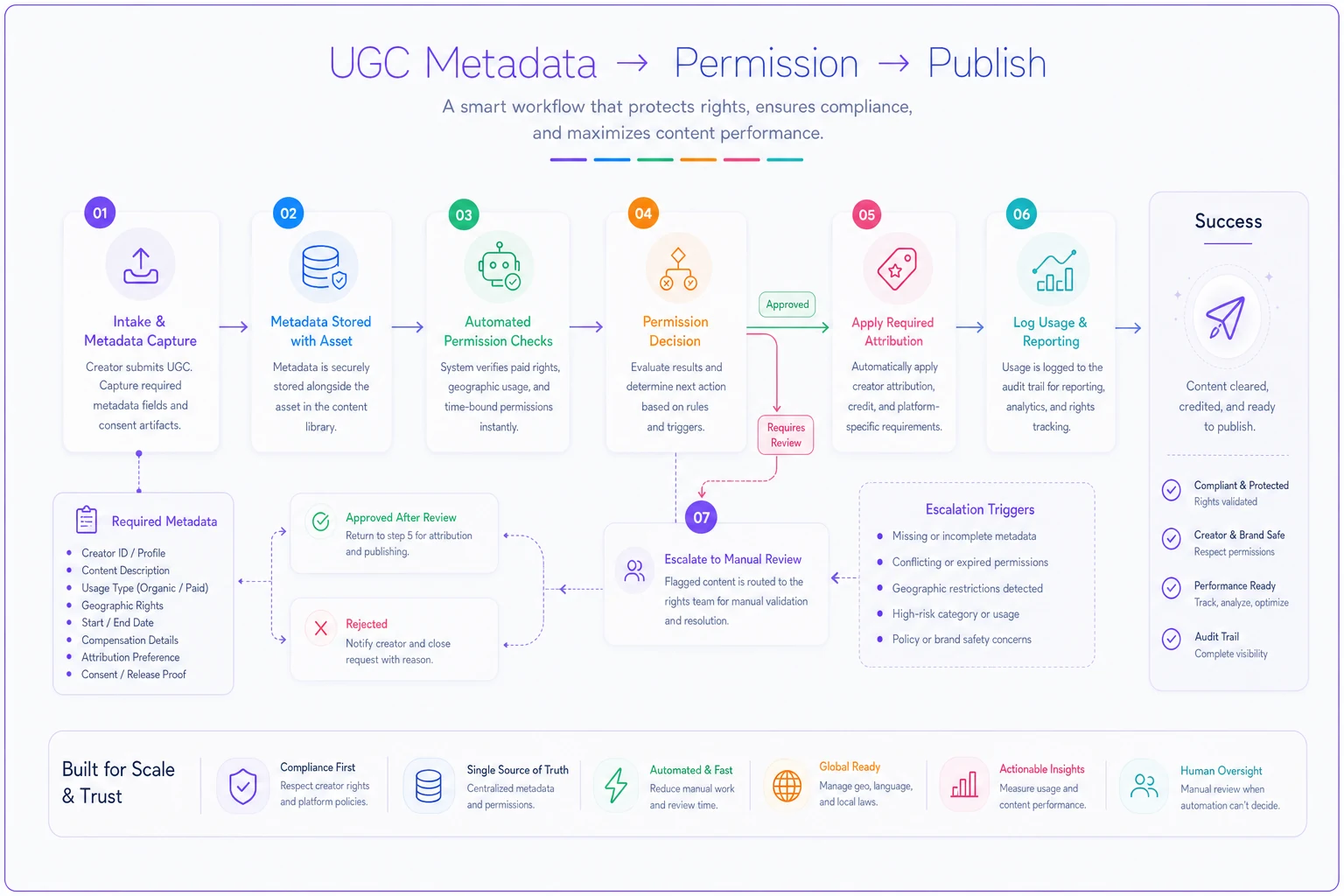
When someone exports UGC for a paid campaign, the system should automatically verify paid usage rights exist, check geographic permissions match campaign targeting, confirm no time-based expiration is approaching, apply required attribution, and log usage for reporting.
This only works through proper metadata structure. Each field needs consistent formatting, defined acceptable values, and clear relationships to other fields.
For teams running multiple concurrent campaigns, this also prevents the common nightmare of accidentally pulling submissions from a competitor campaign into your brand campaign because someone grabbed the wrong folder.
Real-world example: fashion retailer's seasonal UGC operation
A mid-size fashion retailer runs quarterly UGC campaigns generating roughly 800 submissions per quarter. Before implementing structured metadata and release tracking, their reuse rate was under 5% — not because the content was bad, but because nobody could confirm permissions efficiently enough to act on it.
Their updated system captures 18 metadata fields at submission, with automated API connections pulling creator info from social platforms. Release agreements use modular checkboxes for eight different usage categories.
Around 40% of UGC now gets reused across multiple campaigns. Their Black Friday campaign featured 200+ pieces of UGC from throughout the year, all with confirmed permissions. What previously took two weeks of manual checking now happens automatically.
More importantly, when a creator questioned usage six months later, the team pulled complete documentation in minutes — original submission, signed release, specific permissions granted, and full usage history.
Building sustainable UGC operations beyond single campaigns
Teams that do this well treat UGC as an operational capability, not a series of one-off campaigns. That means building systems that survive staff turnover, platform changes, and legal updates.
Your metadata schema is the foundation. Every operational decision — from approval workflows to content localization — depends on having reliable, structured data about each asset.
Think through edge cases before they happen. What if a creator wants to revoke permissions? How do you track assets that surface in competitor content signals? Can you quickly identify all assets from creators who've since become brand ambassadors?
These aren't hypotheticals. They come up more often than teams expect, and the ones without clean metadata end up making judgment calls under deadline pressure.
The technical architecture most teams actually need
You don't need enterprise DAM software to implement effective UGC tracking. Most teams can build functional systems using existing tools with proper structure.
At minimum, you need structured intake forms that enforce metadata capture, a central repository with consistent folder structure, a database or well-structured spreadsheet tracking metadata, basic automated permission checking, and regular audit processes to catch gaps.
Start with the full metadata schema even if your tools are basic. It's much easier to migrate structured data to better tools later than to retroactively add metadata to thousands of unstructured assets.
For growing teams, AI-powered operational software handles the heavy lifting — automatically tracking permissions, flagging expiring rights, and maintaining audit trails without manual oversight. The investment pays for itself the first time you avoid a legal issue or can instantly surface the right UGC for a tight deadline.
Making rights management invisible to creative teams
The best UGC rights systems are invisible to creative teams. They shouldn't need to think about permissions while building campaigns — the system should surface only content they can actually use.
That requires thoughtful metadata architecture where permissions automatically filter available assets based on intended usage. A social media manager looking for organic content sees different assets than the paid media team planning video ads.
Smart filtering prevents mistakes without creating friction. Instead of "you can't use that," the system simply doesn't show restricted content for specific use cases. That's a meaningful difference in how teams actually work day to day.
From legal protection to operational advantage
Most teams treat UGC rights as a legal checkbox — get the form signed and move on. But proper rights management becomes a real competitive advantage when you can confidently reuse high-performing content across campaigns while other brands leave assets sitting dormant because nobody can confirm what they're allowed to do with them.
The framework isn't complicated: capture structured metadata at intake, use modular release language that maps to real usage scenarios, implement lightweight approval gates, and maintain clear archival rules. The hard part is maintaining discipline as volume scales.
Teams managing hundreds of UGC assets monthly need more than spreadsheets and good intentions. Whether through disciplined process or automated systems, the goal is the same — make rights management smooth enough that great UGC gets maximum reuse while risk stays minimal.
The brands winning with UGC aren't necessarily creating better content. They're running better systems that turn one-time submissions into renewable marketing assets. That operational difference compounds over time, building a library of proven content with clear permissions while competitors scramble to verify rights before every campaign.
Ready to amplify your brand’s voice?
Join 2,500+ marketers using Postyly to save time, boost engagement, and grow their audiences effectively.