

Most social teams are obsessive about publishing and completely indifferent to retirement. Posts go up, perform, fade, and then just... sit there. Years of content piling up on a brand page — half of it contradicting current pricing, referencing discontinued products, or carrying expired promos and campaign jokes that stopped being funny two reorgs ago.
Nobody owns the backend. And the longer a page runs, the more that neglected archive becomes a liability instead of an asset.
A social content retirement policy is the missing half of content operations. You already have intake rules, approval flows, publishing checklists. What you usually don't have is a documented answer to a pretty simple question: when does a post stop being allowed to exist publicly, and who decides?
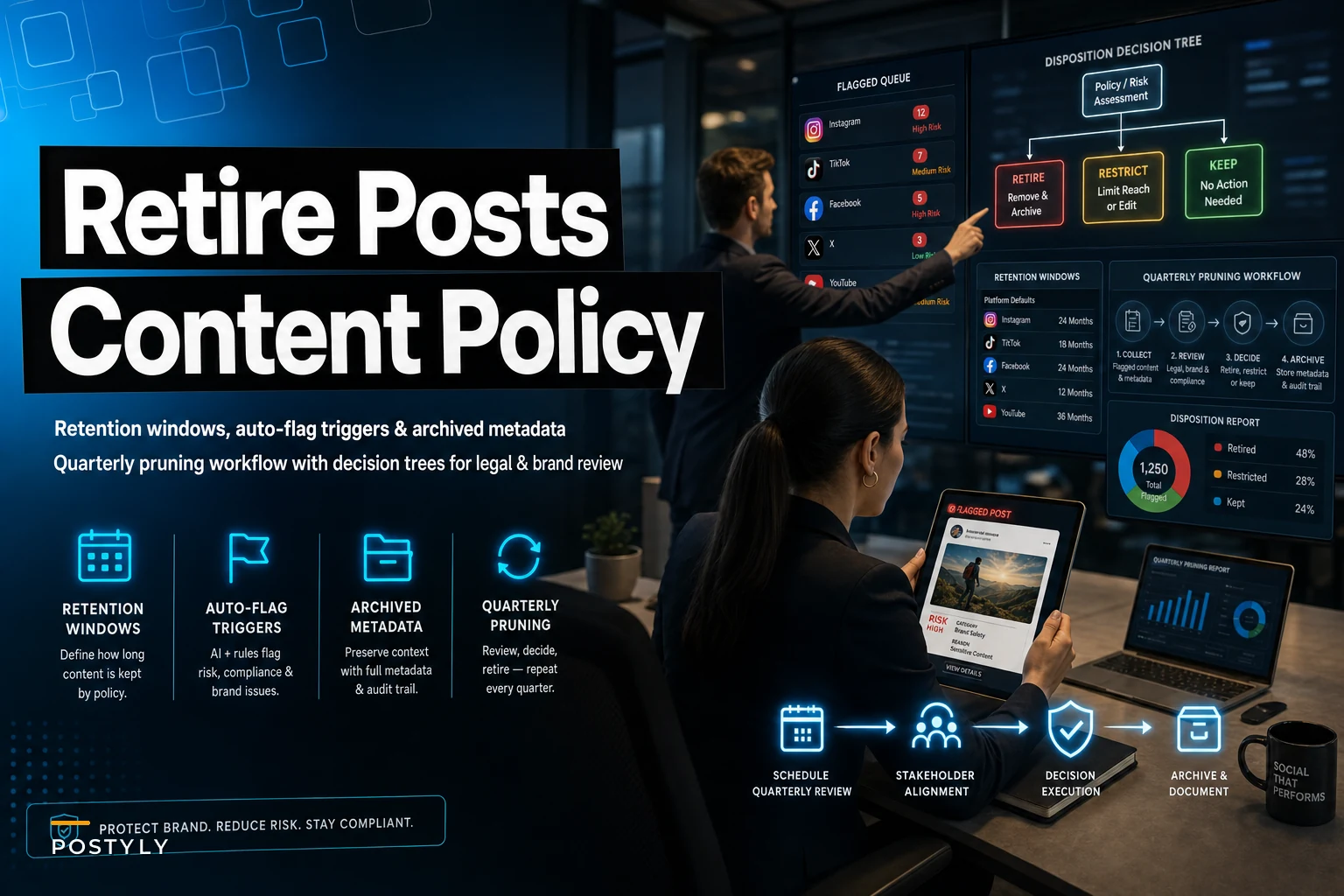
This is that answer — retention windows by content type, the triggers that should flag a post for review automatically, the metadata you need to capture before anything gets pulled, and a quarterly pruning workflow with the legal and brand checks already baked in.
Why old posts turn into problems, not just clutter
The instinct is to treat an aging feed as harmless. It's not, and the damage shows up in uneven ways.
A promo post from eighteen months ago still sits in your Instagram grid saying "20% off, this week only." Someone screenshots it and demands the discount. Now customer service is improvising a policy on a dead campaign.
An old product announcement references a feature you sunset. A journalist or a competitor finds it. Suddenly the question isn't "is this post old" — it's "why is this brand still claiming something that isn't true."
Then there's the quieter rot: evergreen posts that were genuinely good but now cite 2022 benchmarks, link to redirected pages, or tag a partnership that ended badly. These don't blow up. They just slowly erode trust and accuracy for anyone who scrolls deep enough.
The pattern across most teams is the same — content gets created with a lifecycle in mind and then managed as if it lives forever. Retirement is an afterthought, so it never happens on purpose. It only happens in a panic, after something surfaces.
Retention windows by content type
The core mistake is treating all posts as one bucket. A limited-time offer and an evergreen explainer have nothing in common operationally. They need different clocks.
Stop managing your social media the hard way.
Postyly helps you plan, schedule, and analyze every post with precision.
- Multi-platform scheduling
- Real-time engagement tracking
- Automated performance reports
No credit card required
Here's a working default set of retention windows. These aren't legal mandates — they're operational defaults you adjust based on your brand, regulatory exposure, and platform mix.
| Content type | Default live window | What happens at expiry | Review needed? |
|---|---|---|---|
| Time-bound promo / discount | Length of offer + 7 days | Auto-archive | No |
| Event promotion | Until event date + 14 days | Auto-archive | No |
| Product/feature announcement | 12 months | Flag for review | Yes — brand |
| Campaign creative (branded) | Campaign end + 90 days | Flag for review | Yes — brand |
| Evergreen educational | 18–24 months | Flag for refresh or retire | Yes — brand |
| Partnership / influencer post | Term of agreement | Flag against rights expiry | Yes — legal + brand |
| UGC / customer features | Per release terms | Flag against consent window | Yes — legal |
| Reactive / topical (news, memes) | 30–90 days | Auto-archive | No |
| Policy / compliance statements | Until superseded | Manual review only | Yes — legal |
Build the expiry date in at publish time and move on.
A few things worth calling out.
Promos and reactive content are the easy wins — they should expire automatically with no human in the loop. If a post literally says "ends Friday," there's no reason it should still be live and discoverable the following month. Build the expiry date in at publish time and move on.
Partnership and UGC posts are the dangerous ones, because their retention isn't about freshness — it's about rights. A customer who let you repost their photo for twelve months becomes a legal exposure on month thirteen. If your rights windows and your content windows aren't linked, you'll miss these. This is exactly why intake metadata matters so much, and it ties directly into how you handle UGC rights and releases, including intake metadata and archival rules for reusable assets.
Evergreen content is its own decision — retire or refresh. Most of the time a good evergreen post shouldn't be killed, it should be updated. That's a separate workflow, and if you've built a seasonal evergreen refresh system with taxonomy and selection rules, the expiry flag should route into that pipeline instead of straight to the archive.
Auto-flag triggers: what should raise its hand on its own
Retention windows handle time. But posts also go stale for reasons that have nothing to do with age. You want triggers that flag content regardless of how old it is.
These are the signals worth wiring up:
-
Expired offer language — any post containing "% off," "sale," "limited time," "ends," "this week" past its offer window
-
Broken or redirected links — a link in a post returning a 404 or landing somewhere unexpected
-
Discontinued product mentions — posts referencing a SKU or feature flagged as sunset in your product catalog
-
Rights expiry approaching — partnership or UGC posts within 30 days of a consent or agreement end date
-
Pricing mentions — any post stating a specific price, flagged whenever pricing changes
-
Low-performance long-tail — evergreen posts whose engagement has dropped below a floor for two consecutive quarters
-
Policy supersession — compliance or disclosure posts tied to a policy that has a newer version
-
Tagged-entity conflicts — posts tagging a partner, employee, or vendor relationship that has since ended
Most teams build one trigger — the date — and stop there. But a date doesn't catch a pricing change, a product sunset, or a partner falling out. Those are event-driven, not time-driven. A real retirement policy needs both clocks running.
A practical example of why this matters: a mid-size DTC brand changed its subscription price and had roughly forty legacy posts mentioning the old price scattered across Instagram, Facebook, and a few pinned tweets. Without a pricing trigger, they'd have found those one customer complaint at a time. With it, all forty surfaced the same afternoon for a single batch review.
The archived metadata schema
This is the part almost everyone skips, and it's the part that makes the whole system auditable later.
When you retire a post, you don't just delete it. You capture why, when, who decided, and what it was — so that six months later when someone asks "whatever happened to that campaign post," you have an answer instead of a shrug.
A minimum archive record should capture:
-
Post ID / permalink — original platform identifier
-
Content type — mapped to your retention categories
-
Original publish date and retirement date
-
Retirement reason — expired / superseded / rights-lapsed / off-brand / performance / legal
-
Trigger source — which auto-flag or manual review raised it
-
Decision owner — who approved the retirement
-
Review path taken — brand only / legal only / both / none
-
Disposition — archived-visible, archived-hidden, deleted, refreshed-and-republished
-
Linked assets — associated creative, rights documents, campaign ID
-
Restoration eligibility — can this be reused, and under what conditions
That last field matters more than people expect. Not everything you retire is dead forever. A campaign post pulled because the offer expired might be perfectly reusable creative next season. If your archive doesn't distinguish "gone because wrong" from "gone because expired," you lose the ability to mine your own back catalog.
This schema should slot into your existing content taxonomy rather than live as a separate spreadsheet nobody opens. An orphaned archive log decays the same way the feed does — within a quarter or two it's incomplete, and an incomplete audit trail is barely better than none.
The quarterly pruning workflow
Daily retirement is noise. Annual is too slow — you accumulate a full year of exposure between cleanups. Quarterly is the sweet spot for most teams: frequent enough to stay current, infrequent enough that it's a real scheduled event with actual owners, not a background task everyone quietly ignores.
Here's the workflow, step by step.
-
1. Generate the flagged queue (week 1 of the quarter). Pull everything that tripped an auto-flag plus everything that hit its retention window since last review. This is your raw candidate list. Expect it to be bigger than you think the first time — the first quarterly prune on a neglected page is always the ugly one.
-
2. Auto-dispose the clear cases. Expired promos, past events, aged reactive content — anything in your "no review needed" categories gets archived without a meeting. Separating these out keeps humans focused on judgment calls only. Typically this handles the majority of the queue.
-
3. Route the rest through the decision tree. For each remaining post, walk it through: - Does it mention a current legal or rights obligation (partnership term, UGC consent, regulated claim)? → Legal review required. - Does it make a brand claim, product statement, or pricing reference that may now be wrong? → Brand review required. - Is it evergreen and underperforming but still accurate? → Route to refresh pipeline, not retirement. - Is it simply old and irrelevant with no risk? → Archive, brand sign-off optional. - Is it flagged but still accurate and performing? → Keep, reset the clock.
-
4. Run the review passes. Legal reviews the legal-flagged set — they're checking exposure, not aesthetics. Brand reviews the brand-flagged set — they're checking accuracy and tone. Keep these passes separate. Mixing them is how legal ends up debating caption voice and brand ends up guessing at consent windows.
-
5. Record disposition and update the archive. Every decision gets written to the metadata schema above. No post leaves the queue without a logged reason and an owner.
-
6. Report the summary. A short close-out
how many retired, how many refreshed, how many kept, and any patterns worth flagging — like "we keep finding old posts with the deprecated logo, we should sweep for that specifically next quarter."
The decision tree, as a quick reference
-
Legal risk present? → Legal review → then dispose
-
Brand accuracy risk? → Brand review → then dispose or refresh
-
Evergreen + accurate + weak performance? → Refresh pipeline
-
Old, harmless, irrelevant? → Archive
-
Still good? → Keep + reset retention clock
The whole point of the tree is to stop treating retirement as a single decision. "Should this go?" is actually three different questions — is it a risk, is it fixable, is it reusable — and each one routes somewhere different. Getting those three questions separated is what turns a chaotic cleanup session into a repeatable process.
Here's a simple visual of the quarterly pruning workflow.
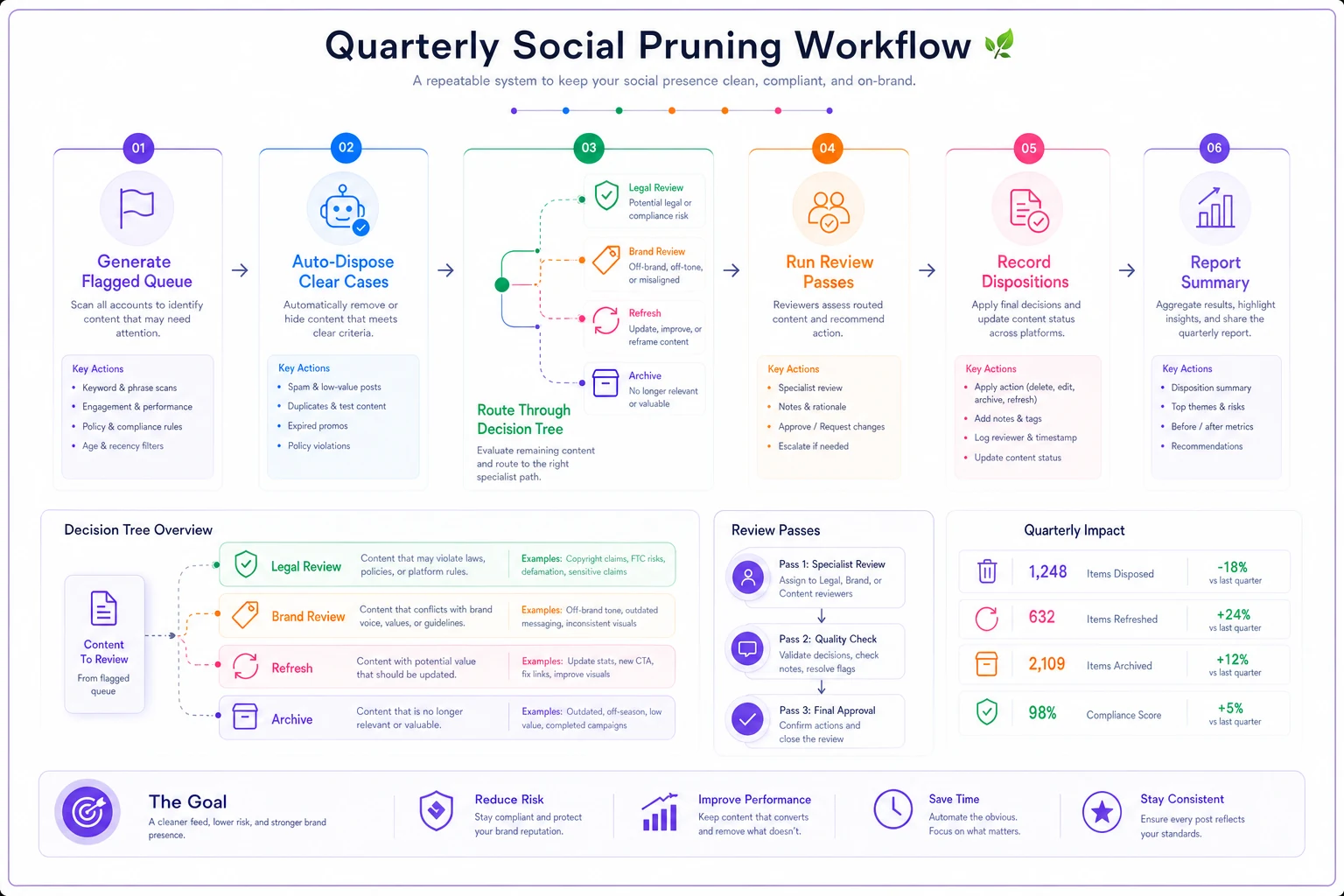
A short flowchart like this helps reviewers see where a flagged post should travel each quarter, and who owns each handoff.
When a strict retirement policy makes sense — and when it doesn't
When it's clearly worth it: Regulated industries (finance, health, anything with disclosure requirements), brands running heavy promo calendars, any team doing significant UGC or influencer work, and any account old enough that nobody remembers what's buried in it. If you can't quickly answer "do we have any live posts mentioning the old price," you need this.
When it's overkill: A brand-new account with a few dozen posts, all current, all accurate, doesn't need a quarterly ceremony. For small teams in low-risk categories, a lightweight version — expire promos automatically, review once a year — is plenty. Don't build a legal-review workflow for a feed that has zero legal exposure.
Who should be careful: Teams tempted to delete aggressively. Deletion is permanent and sometimes you need the record — for disputes, for audits, for reusing creative. Default to archive, not delete, unless there's a specific reason the content must be gone entirely. The teams that get burned usually got burned by deleting something they later needed to prove existed.
A short real scenario
A regional home-services company — about 60 service areas, active on Facebook and Instagram for roughly six years — had never retired a single post. Their feed had old seasonal promos ("winter tune-up, $89"), discontinued service mentions, and a couple of posts tagging a former franchise location that had closed.
The breaking point was predictable: a customer screenshotted the expired $89 promo and demanded the price. Then another did. Service reps had no policy, so they caved inconsistently — some honored it, some didn't, which generated complaints either way.
They ran a first full prune. The flagged queue came back at around 230 posts. Most were easy auto-disposals — expired promos and dead event posts. About 30 needed brand review for accuracy, and a handful needed legal review for the closed-location tags and an old partnership mention. Cleaning it up took the better part of two weeks that first time because of the backlog.
The next quarter's prune took an afternoon. The expired-promo complaints stopped almost entirely once the stale offers were off the public feed, and the inconsistent discount concessions — which had been quietly costing a few hundred dollars here and there every month — basically disappeared. Nothing dramatic. Just a feed that finally reflected what the company actually sold and charged.
The one thing to get right first
If you implement only one piece of this, make it the auto-flag on expired offers and pricing. That's where the real-world pain concentrates — it's the trigger that stops customers from waving dead promos at your service team, and it's the easiest to justify to anyone who asks why you're spending time on cleanup.
Everything else — the metadata schema, the legal review passes, the quarterly cadence — builds the durable system. But the retirement policy earns its keep the first time an expired offer doesn't become a customer service fight, because it quietly disappeared on schedule instead of lingering for a year waiting to cause trouble.
If you implement only one piece of this, make it the auto-flag on expired offers and pricing. That's where the real-world pain concentrates — it's the trigger that stops customers from waving dead promos at your service team, and it's the easiest to justify to anyone who asks why you're spending time on cleanup.
Everything else — the metadata schema, the legal review passes, the quarterly cadence — builds the durable system. But the retirement policy earns its keep the first time an expired offer doesn't become a customer service fight, because it quietly disappeared on schedule instead of lingering for a year waiting to cause trouble.
Ready to amplify your brand’s voice?
Join 2,500+ marketers using Postyly to save time, boost engagement, and grow their audiences effectively.